Customer 360 Omnichannel Experience Services
Connect Every Customer Interaction Into One Connected Experience
Your customers do not interact with your business through a single channel. They discover your brand through search, visit your website, engage with a campaign, speak with sales, purchase a product or service, contact support, receive an invoice, and interact with customer success.
The problem is not having multiple channels. The problem is when those channels do not understand the same customer. Customer 360 Omnichannel Experience connects relevant customer interactions, data, systems, and business processes to create a more consistent customer journey across channels.
NuageCX helps businesses connect customer-facing and operational systems across CRM, ERP, marketing, sales, customer service, customer success, automation, and analytics to create a connected customer experience.
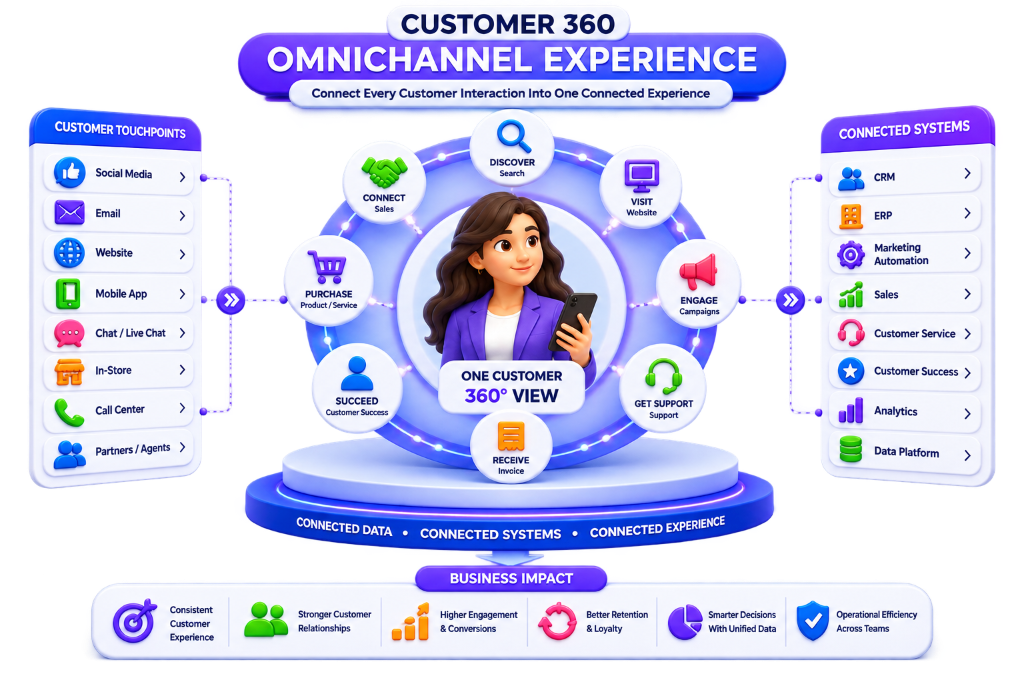
What Is Customer 360 Omnichannel Experience?
Customer 360 Omnichannel Experience connects relevant customer data and interactions across multiple channels so businesses maintain complete customer context throughout the relationship.
Customers interact through 11 key touchpoint channels:
Website
Browsing activity, digital forms, and documentation
Campaign responses, automated alerts, and 1:1 emails
Phone
Inbound and outbound voice calls with automatic logging
Live Chat
Real-time web chat, bot conversations, and handoffs
Social Media
Brand inquiries, messages, and social engagement
Sales Reps
Direct sales meetings, product demos, and negotiations
Customer Portals
Self-service knowledge bases, ticket tracking, and docs
Support Teams
Technical helpdesk tickets, escalations, and resolutions
Mobile Apps
In-app interactions, telemetry events, and push messages
Physical Locations
In-person visits, retail stores, and service depots
Events & Seminars
Webinar attendance, trade shows, and roundtables
*Customer 360 connects relevant information from these interactions with customer, account, transaction, and service data for a truly cohesive customer journey.
Why Is Customer 360 Omnichannel Experience Important?
Customers expect businesses to understand their previous interactions. Disconnected systems force customers to repeat themselves over and over:
The Customer Experience Problem Businesses Face:
When Marketing, CRM, ERP, Service, and Customer Success operate in silos, the result is duplicate records, missing history, poor handoffs, delayed follow-ups, and fragmented communication. Customer 360 Omnichannel Experience creates continuity across all touchpoints.
Multichannel vs. Omnichannel Customer Experience
Understanding the fundamental difference between simply offering multiple touchpoints and orchestrating connected customer context:
Multiple Independent Channels
A business offers multiple channels (Website + Email + Phone + Chat + Social Media), but each channel operates independently without shared customer context:
Shared Context Across Channels
An omnichannel approach connects relevant customer context across those channels so context follows the customer everywhere:
How Does Customer 360 Create an Omnichannel Experience?
A 10-step continuum translating disparate channel interactions into unified, personalized experiences:
Typical Omnichannel B2B Customer Journey:
Customer 360 Omnichannel Customer Data
A connected omnichannel experience harmonizes 6 critical categories of customer information:
Identity Data
- • Name & Contact Details
- • Business Email ID
- • Verified Phone Number
- • Company Name & Domain
- • Unified Customer ID
- • Parent Account ID
Profile Data
- • Industry & Market Sector
- • Customer Tier / Account Size
- • Operational Unit & Hierarchy
- • Communication Preferences
- • Lifecycle Stage Status
Interaction Data
- • Logged Phone Calls & Recordings
- • 1:1 Inbound / Outbound Emails
- • Live Chat Transcripts
- • Meeting Notes & Action Items
- • Website Page Views & Dwell
- • Support Conversations
Transaction Data
- • Historical & Active Orders
- • Purchased Products & SKUs
- • ERP Invoices & Balances
- • Payment Confirmations
- • Active Subscription Terms
Service Data
- • Support Tickets & Cases
- • SLA Entitlement Tiers
- • Technical Escalation Logs
- • First-Contact Resolution Metrics
Engagement Data
- • Marketing Campaign Engagement
- • Resource & Content Downloads
- • Cloud Product Usage Telemetry
Relationship Continuity
Connecting CRM with other customer systems provides sales and service teams with complete historical context:
Transactional Continuity
When ERP transactional data is linked with customer-facing systems, teams understand both relationship context and financial reality:
Omnichannel Experience Across Specialized Teams
Providing every internal team with the customer context needed to deliver consistent experiences:
Marketing Experience
Contextual audience reach:
- • Nurturing based on sales status
- • Smart segment exclusion
- • Product adoption campaigns
- • Renewal awareness tracks
Sales Experience
Holistic account visibility:
- • Prior meeting & chat history
- • Real-time service ticket alerts
- • Active ERP contract terms
- • Product usage telemetry
Customer Service
Rapid, informed resolutions:
- • Complete purchase records
- • Zero verification repetition
- • SLA entitlement indicators
- • Empathetic escalation routing
Customer Success
Proactive account health:
- • Onboarding completion rates
- • Longitudinal health scoring
- • Early churn warning alerts
- • Expansion opportunity triggers
Customer 360 Omnichannel Automation
Connecting customer journeys creates opportunities for automated execution across 5 key workflows:
Lead Journey
Inquiry → Lead assignment → Contextual follow-up → Sales alert
Onboarding
Purchase → Welcome email → Task creation → Onboarding workflow
Support Routing
New ticket → Classification → Agent assignment → Auto escalation
Renewal Cadence
Approaching renewal → Health check → CS task → Outreach
Feedback Loop
Interaction finished → Feedback request → Score logged → Analysis
Omnichannel Solutions for Different Industries
Tailoring omnichannel architectures to industry-specific operational requirements:
B2B Enterprise
Connects marketing, sales, account management, ERP operations, service, and customer success across multi-stakeholder deals.
SaaS & Cloud
Connects acquisition, free trials, conversion, digital onboarding, feature telemetry, in-app support, and annual renewals.
Manufacturing
Connects inquiry, customized quotation, ERP production, delivery tracking, on-site installation, and maintenance SLAs.
E-commerce
Connects website browsing, checkout transactions, delivery notifications, helpdesk chat, and post-purchase repeat offers.
Professional Services
Connects lead generation, pitch proposals, project milestone delivery, client communication, billing, and account growth.
Customer 360 Omnichannel Dashboard & 16 KPIs
A 6-module command console backed by 16 operational performance KPIs:
Customer Overview
Unified profile, account hierarchy, lifecycle status, dynamic segment, and health score
Engagement Module
Website activity, campaign open rates, chat sessions, and sales meeting velocity
Transactions Module
ERP orders, active revenue, invoice payment aging, and contract values
Service Desk Module
Ticket volume, first response time, average resolution speed, and escalations
Experience Module
Customer Satisfaction (CSAT), Net Promoter Score (NPS), CES, and qualitative feedback
Retention & Expansion
Contract renewal status, churn risk indicators, expansion pipeline, and LTV
16 Core KPIs for Customer 360 Omnichannel Experience:
11-Step Omnichannel Implementation Methodology
NuageCX follows an established, end-to-end delivery framework:
Step 1: Identify Journeys
Map the major journeys from initial acquisition to long-term retention.
Step 2: Map Touchpoints
Document where and how customers interact with the organization across channels.
Step 3: Identify Data
Determine what customer information is required at each interaction milestone.
Step 4: Audit Systems
Review CRM, ERP, marketing, service desk, customer success, and analytics tools.
Step 5: Identify Gaps
Locate missing, duplicate, conflicting, or delayed customer records across silos.
Step 6: Integration Specs
Define real-time sync, webhooks, APIs, and batch sync requirements between systems.
Step 7: Customer Identity
Define how customer and account records will be matched and unified across systems.
Step 8: Architecture Design
Establish data flows, governance guardrails, workflows, and system responsibilities.
Step 9: Automate Journeys
Automate repetitive customer handoffs and internal notification triggers.
Step 10: Implement Analytics
Deploy dashboards to track channel conversion, drop-off rates, and CSAT.
Step 11: Continuous Optimize
Iterate workflows and AI models using real-world customer telemetry and feedback.
How Much Does It Cost?
Implementation cost depends on the number of systems, number of channels, data volume, integration complexity, data quality, journey complexity, automation workflows, custom development, analytics, migration, and security.
There is no single price. A proper assessment determines the exact scope and investment.
How Long Does It Take?
Implementation time depends on the number of applications, journeys, integration complexity, data readiness, migration requirements, automation depth, customization, testing, and user adoption.
A focused journey optimization can be completed rapidly in weeks, whereas an enterprise-wide transformation is delivered in structured milestones.
When Should a Business Implement Customer 360 Omnichannel Experience?
Why Choose NuageCX for Customer 360 Omnichannel Experience?
Customer 360 should not be treated as simply connecting software. The real challenge is connecting people, processes, customer data, and technology around the customer journey.
Business Process First
We understand how your business works before defining technology architecture.
Zoho Ecosystem Mastery
Deploy across Zoho CRM, Desk, Flow, Analytics, and Creator seamlessly.
CRM + ERP Integration
Connect relationship records with transactional ERP data for full visibility.
Customer Journey Design
Map touchpoints and build connected journeys around actual business processes.
Custom Development
Design bespoke integrations and custom modules when out-of-the-box is insufficient.
Cross-Department Workflows
Connect marketing, sales, operations, finance, service, and CS playbooks.
Industry-Specific Models
Tailor customer journeys to the operational realities of your vertical.
Data Migration & Sync
Move and clean legacy data into the unified Customer 360 architecture.
Analytics & Real-time Insights
Measure journey conversion, CSAT, customer health, and commercial growth.
End-to-End Implementation
Support discovery, architecture, deployment, testing, and continuous optimization.
Related Customer 360 Solutions
Explore the complete suite of Customer 360 engineering and consulting capabilities:
Customer 360 Automation
Connect repetitive customer and internal processes through Customer 360 automation.
Customer 360 Workflow Automation
Automate customer lifecycle and cross-department operational workflows.
Customer 360 Customer Experience
Build a connected customer experience using unified customer context.
Customer 360 Personalization
Use relevant customer information to create contextual customer interactions.
Customer 360 Customer Journey
Map and optimize customer journeys across lifecycle stages and touchpoints.
Customer 360 Integration
Connect CRM, ERP, and critical business applications across the enterprise.
Frequently Asked Questions
Everything you need to know about Customer 360 Omnichannel Experience Services:
Start Your Customer 360 Omnichannel Transformation
If your customer information is spread across CRM, ERP, marketing, sales, service, and other systems, the first step is understanding how those systems currently work together. NuageCX can assess your existing environment, customer journeys, data sources, and integration requirements to help define an appropriate Customer 360 roadmap.