Customer 360 Customer Journey Automation Services
Automate relevant customer journeys across marketing, sales, service, onboarding, retention, and customer success with Customer 360 Customer Journey Automation.
NuageCX helps businesses connect customer data, define journey stages, identify customer actions and triggers, and automate appropriate workflows across the customer lifecycle.
Customer 360 Customer Journey Automation can help businesses reduce manual processes, improve response times, create consistent customer experiences, and ensure that relevant customer actions trigger the right business workflows.
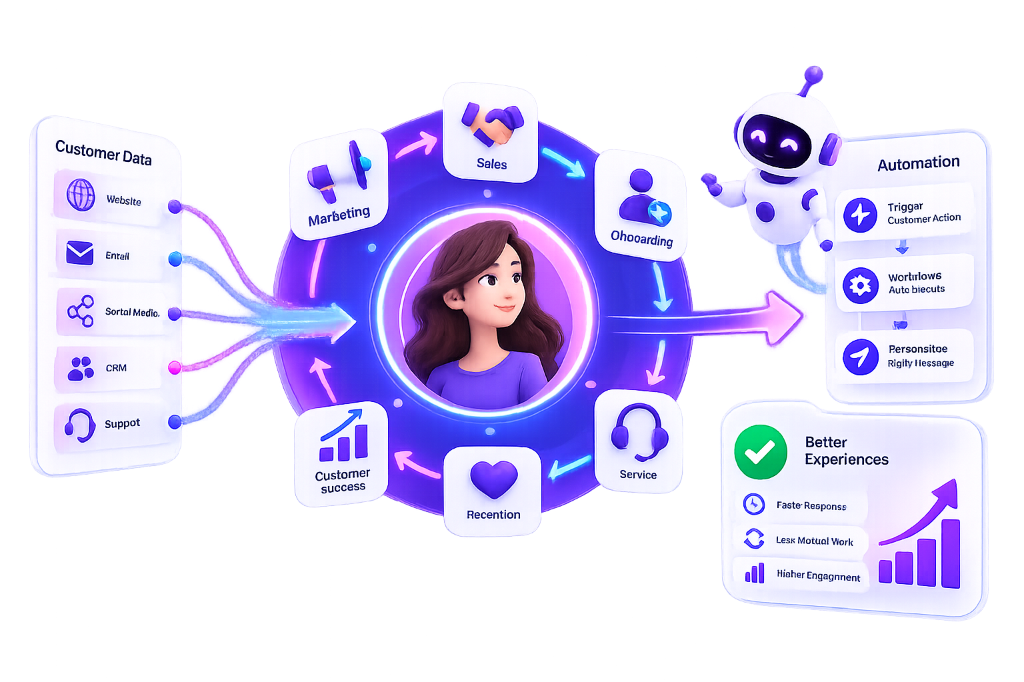
What Is Customer 360 Customer Journey Automation?
Customer 360 Customer Journey Automation uses connected customer information, defined business rules, customer actions, and workflow automation to deliver relevant actions across the customer lifecycle.
Instead of treating every customer interaction independently, businesses can create automated journeys based on:
Customer Profile
Authoritative golden record attributes and verified demographic data
Customer Segment
Dynamic cohorts based on tier, industry, TAM, and engagement
Lifecycle Stage
Current milestone from prospect qualification through expansion
Purchase Activity
Historical transactions, order frequencies, and commercial velocity
Sales Activity
Deal progression, rep meetings, proposal submissions, and pipeline alerts
Customer Engagement
Portal logins, email interactions, event attendance, and feature exploration
Product Usage
Active telemetry, license capacity consumption, and session depth
Service Interactions
Support ticket volume, escalation severity, and resolution speed
Renewal Status
Contract expiration proximity, renewal risks, and agreement terms
Customer Behavior
Changes in navigation frequency, drop-offs, and feature adoption
Customer Health
Multi-dimensional composite rating evaluating sentiment & engagement
Defined Business Events
Explicit threshold crossings, commercial triggers, or compliance dates
*Automation can then trigger appropriate actions across connected business systems without manual administrative friction.
Why Is Customer 360 Customer Journey Automation Important?
Customer journeys often involve multiple departments and systems. A customer regularly interacts with:
The Cost of Disconnection: Without connected automation, teams rely on manual follow ups, disconnected workflows, and repetitive processes that lead to missed customer signals and churn.
Customer 360 Automation Helps Businesses Achieve:
How Does Customer 360 Customer Journey Automation Work?
A disciplined, continuous 10-step methodology turning customer behavior into operational execution:
Identify the Customer Journey
Define the customer lifecycle and identify all critical journey milestones.
Identify Customer Data
Determine which customer attributes and behavioral telemetry are required for automation.
Connect Relevant Systems
Integrate CRM, ERP, marketing, service, analytics, and operational systems.
Define Customer Events
Identify actions, thresholds, or events that should trigger business workflows.
Define Business Rules
Determine exact deterministic branching logic when specific conditions are met.
Create Automated Workflows
Build resilient workflows that perform appropriate multi-channel actions.
Personalize the Journey
Use customer context to determine the appropriate tailored next action.
Route Tasks
Assign activities to the appropriate sales, service, success, or operations teams.
Measure Outcomes
Track journey progression, completion rates, and real operational performance.
Optimize
Continuously improve workflows based on business outcomes and real customer behavior.
Customer 360 Customer Journey Automation Framework
This architecture creates an unbroken connection between customer intelligence and operational action:
Departmental Journey Automation
Empowering specialized teams with unified customer context and deterministic workflow triggers:
Marketing Automation
Triggers based on customer criteria & consent:
- Campaign enrollment
- Email communication
- Lead nurturing
- Customer segmentation
- Re engagement
- Event communication
- Product communication
- Cross sell campaigns
- Upsell campaigns
Sales Automation
Reduces admin work while preserving context:
- Lead assignment
- Follow up tasks
- Opportunity creation
- Account alerts
- Sales notifications
- Renewal reminders
- Cross sell opportunities
- Upsell opportunities
- Customer engagement tasks
Service Automation
Enforces SLA rules with account context:
- Case assignment
- Escalation
- Customer notifications
- Follow up tasks
- Priority routing
- Service reminders
- Customer health alerts
Success Automation
Coordinates proactive account growth:
- Onboarding
- Customer health monitoring
- Adoption campaigns
- Follow ups
- Renewal preparation
- Risk alerts
- Expansion workflows
- Customer education
Customer Onboarding Automation Workflow
Customer onboarding includes sequential automated workflows that eliminate friction:
*The exact workflow depends on the organization's unique customer model and onboarding milestones.
Renewal Automation
Evaluates contract dates, engagement, usage, service activity, value, health, and renewal status.
Retention Automation
Triggered by defined risk signals to automatically route accounts for team intervention:
Churn Prevention Framework
A validated, deterministic mitigation pathway:
*Churn prediction must be validated before being used as an automated decision trigger.
Cross-Sell & Upsell Automation
Connecting customer profile, purchase history, and product capacity into timely revenue expansion opportunities:
Cross-Sell Automation
Identifies customers relevant for complementary products or services based on:
Upsell Automation
Expands accounts reaching product utilization or plan thresholds based on:
Behavioral, Event-Driven & Rule-Based Automation
Multi-tiered decision framework turning actions into deterministic outcomes:
Customer Engagement
Responds to relevant customer activities:
- • Website interaction
- • Email engagement
- • Product activity
- • Customer portal activity
- • Purchase transaction
- • Service interaction
- • Event participation
Behavioral Automation
Reliably captured behavioral inputs:
- • Customer becomes inactive
- • Customer reaches usage milestone
- • Customer makes a purchase
- • Support request submitted
- • Lifecycle stage reached
- • Campaign engagement
Event-Driven Automation
Event-to-action triggers:
11 Core Triggers
Meaningful business moments:
Rule-Based Automation Logic
Deterministic conditions:
AND: Product usage reaches defined threshold
AND: Customer segment is eligible
THEN: Create expansion opportunity for assigned account owner.
*Rules must be documented, tested, and reviewed regularly.
Personalized Automation
Parameters determined by customer data:
Multi-Department Progression
Crossing organizational boundaries:
CRM, ERP, Integration & Customer Identity Resolution
Automation depends entirely on reliable access to accurate customer context across enterprise repositories:
CRM Automation
- • Lead management
- • Contact management
- • Account activities
- • Opportunity workflows
- • Follow ups
- • Sales alerts
- • Lifecycle actions
ERP Connected Data
- • Orders
- • Invoices
- • Payments
- • Products
- • Transactions
- • Account finance info
8 Source Integrations
- • CRM & ERP
- • Marketing platforms
- • Customer service
- • E-commerce stores
- • Product systems
- • Analytics engines
- • Customer portals
Identity Resolution
Connects records across:
Without Customer Identity Resolution, Automation Causes:
Analytics, Dashboards, AI & Next Best Action
Closing the loop between workflow execution, predictive scoring, and continuous optimization:
Journey Metrics
- Customers in journey
- Journey progression
- Conversion rates
- Drop off velocity
Workflow Metrics
- Trigger volume
- Completed workflows
- Failed workflows
- Processing time
Customer Metrics
- Engagement index
- Retention rates
- Churn risk score
- Customer health rating
Business Metrics
- Revenue expansion
- Expansion deals closed
- Renewal conversion
- Journey ROI
8 AI Automation Powers
Machine intelligence supporting workflows:
Predictive Analytics
Signals supporting automated intervention:
Next Best Action Framework
Deterministic contextual sequence:
Customer 360 Journey Automation Use Cases
High-impact operational scenarios deployed across client environments:
Lead to Customer
Automate relevant handoffs from marketing to sales and customer onboarding.
Customer Onboarding
Automate onboarding tasks, communications, and milestones.
Customer Engagement
Trigger relevant engagement based on customer activity.
Customer Retention
Create workflows around validated retention signals.
Renewal Management
Trigger renewal preparation and follow ups.
Cross Sell
Identify eligible customers for relevant additional products.
Upsell
Identify potential expansion opportunities.
Customer Service
Route cases and trigger relevant service workflows.
Customer Success
Automate health reviews, adoption activities, and follow ups.
Customer 360 Automation Challenges
Customer 360 Automation Best Practices
Customer 360 Automation Implementation Roadmap
NuageCX executes a disciplined 12-phase delivery roadmap:
Phase 1: Journey Discovery
Map important customer journeys.
Phase 2: Process Assessment
Identify manual processes and automation opportunities.
Phase 3: Data Assessment
Identify required customer data and sources.
Phase 4: Integration
Connect relevant systems.
Phase 5: Identity Resolution
Establish customer and account matching logic.
Phase 6: Trigger Definition
Define events that initiate workflows.
Phase 7: Business Rules
Define conditions and outcomes.
Phase 8: Workflow Development
Build automation workflows.
Phase 9: Testing
Test normal, exception, and edge cases.
Phase 10: Deployment
Release workflows to production.
Phase 11: Monitoring
Track workflow execution and failures.
Phase 12: Optimization
Improve journeys using analytics and business outcomes.
How Much Does It Cost?
Cost depends on workflows, systems, integration complexity, data volume, business rules, journey complexity, AI requirements, real time needs, security, governance, and monitoring.
There is no fixed Customer 360 automation cost. A business assessment can determine the appropriate scope.
How Long Does It Take?
Implementation time depends on the number of customer journeys, applications, integration requirements, data quality, identity complexity, workflow logic, business rules, testing, and governance.
A single onboarding workflow can have a substantially different timeline from an enterprise-wide journey automation program.
7-Phase Iterative Rollout
When Should a Business Implement Customer 360 Automation?
Customer 360 Automation Across Industries
Tailored workflows engineered around specific customer relationship models:
SaaS Businesses
- Trial journeys
- Activation cadences
- Onboarding milestones
- Product adoption tracking
- Customer health scoring
- Contract renewal & expansion
- Churn prevention
B2B Businesses
B2B automation operates seamlessly at both contact and account levels depending on relationship structures.
- Lead to account routing
- Multi-stakeholder updates
- Account health alerts
- Renewal playbooks
E-commerce
Automates post-purchase, engagement, service, retention, and expansion journeys.
- Post purchase care
- Customer engagement cadences
- Service ticket routing
- Cart win-back
Manufacturing
Automates customer workflows around orders, onboarding, service, account management, and renewals.
- Order-triggered workflows
- Service warranty claims
- Wholesale account care
- Contract renewals
Key Conceptual Differences
Clarifying core scope distinctions across enterprise automation systems:
C360 Automation vs. CRM Automation
CRM automation focuses primarily on processes managed within or around the CRM. Customer 360 automation coordinates relevant customer journeys across CRM, ERP, marketing, service, product, analytics, and other connected systems.
C360 Automation vs. Marketing Automation
Marketing automation focuses primarily on marketing processes and communications. Customer 360 automation extends beyond marketing to sales, onboarding, service, customer success, retention, renewal, and expansion.
Journey Analytics vs. Journey Automation
Customer Journey Analytics analyzes how customers move through defined journeys. Customer Journey Automation uses customer information and defined rules to trigger actions during those journeys.
Why Choose NuageCX for Customer Journey Automation?
End-to-end architecture, unified data modeling, and turnkey Zoho Ecosystem mastery:
Customer Journey Expertise
Design automation around defined customer lifecycle stages.
Connected Customer Data
Use relevant information from CRM, ERP, marketing, service, analytics, and other systems.
Cross Department Automation
Coordinate customer workflows across sales, marketing, service, customer success, and operations.
Customer Onboarding Automation
Create structured onboarding journeys and workflows.
Retention and Renewal Automation
Support customer retention and renewal processes with appropriate triggers.
Cross Sell and Upsell Automation
Connect relevant customer intelligence with expansion workflows.
AI Supported Automation
Use appropriate AI and predictive analytics for advanced customer journey use cases.
Zoho Automation Expertise
Build customer workflows using relevant Zoho applications and connected business systems.
End to End Automation
Support journey mapping, data integration, identity resolution, business rules, workflow development, testing, deployment, monitoring, and optimization.
Frequently Asked Questions
Everything you need to know about Customer 360 Customer Journey Automation:
Turn Customer Intelligence Into Customer Action
Customer data becomes more valuable when it can drive the right action at the right stage of the customer journey. NuageCX helps businesses connect Customer 360 data with automated workflows across marketing, sales, onboarding, service, customer success, retention, renewal, and expansion.