Customer 360 Data Integration Across CRM, ERP & Business Systems
Connect relevant customer information across CRM, ERP, finance, service, marketing and other business systems to create a more consistent and actionable Customer 360 environment.
NuageCX helps businesses design and implement Customer 360 data integration around their existing systems, customer journeys, data structures and business requirements.
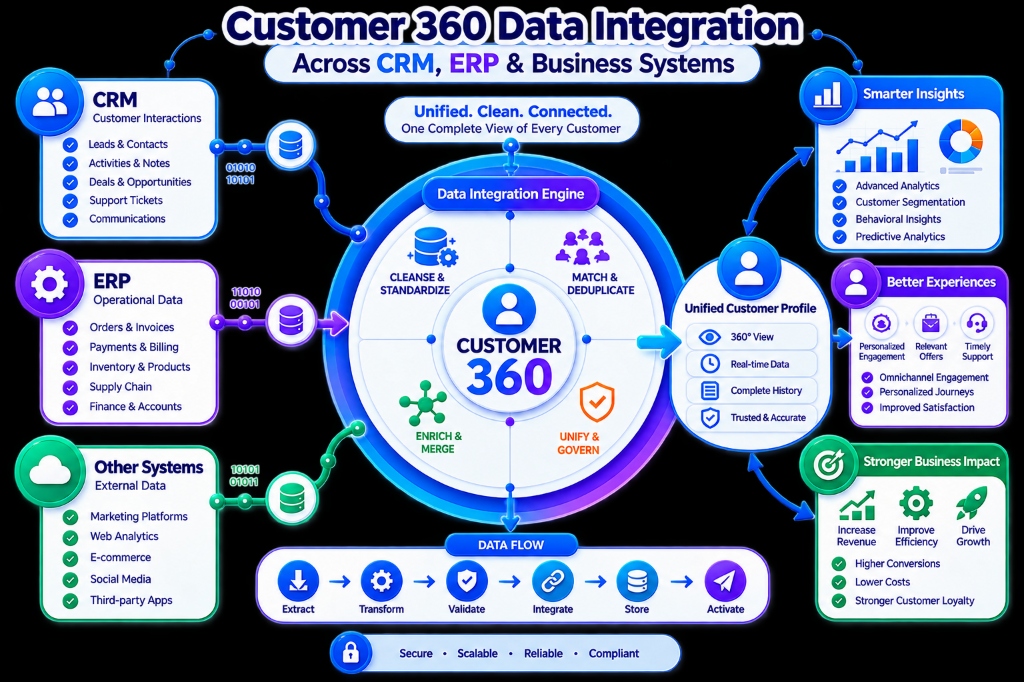
What Is Customer 360 Data Integration?
Customer 360 data integration is the process of connecting relevant customer information from multiple systems so it can be accessed, exchanged and used consistently across the customer lifecycle.
The goal is not simply to move data between systems. The goal is to make relevant customer information available where it is needed to support business processes and customer interactions.
Customer Data May Exist Across:
Data integration connects appropriate sources while maintaining defined data structures, relationships, business rules and ownership.
Why Is Customer 360 Data Integration Important?
Disconnected systems create fragmented customer information across functional silos.
May know the open deal & opportunity context.
May know the invoice status & credit limits.
May know inventory status & order fulfillment.
May know past support tickets & issue history.
May know campaign engagement & lead source.
Without appropriate integration, teams must search multiple systems to understand the customer. Customer 360 data integration connects these information sources so teams can work with broader customer context.
Customer 360 Data Integration Architecture & Lifecycle
A structured lifecycle approach that connects appropriate business layers without unnecessary complexity.
Connected Systems Architecture Model
Customer 360 Data Integration Process
A comprehensive 12-phase technical and operational methodology for end-to-end data connectivity.
Identify Data Sources
Audit all applications and databases where customer records currently reside.
Understand Data Ownership
Determine authoritative systems for CRM deals, ERP orders, finance, and support.
Assess Data Quality
Review duplicate entries, incomplete fields, inconsistent formats, and conflicting keys.
Define Identifiers
Establish primary customer ID, account reference, email, and external system keys.
Map Data Fields
Define precise cross-system field mappings accounting for data types and schemas.
Synchronization Models
Determine whether information moves real-time, scheduled batch, or event-driven.
Select Integration Stack
Choose APIs, native connectors, middleware platforms, webhooks, or ETL pipelines.
Build & Configure
Implement data transformation, routing, error handling, authentication, and logs.
Validate Integrated Data
Verify accuracy, associations, schema validity, and delivery across test environments.
Test Business Workflows
Validate real-world multi-system operational flows like new order or customer creation.
Production Deployment
Activate workflows, user permissions, audit monitoring, and initial migration.
Monitor & Optimize
Track synchronization failures, latency, API rate limits, and evolving data rules.
Cross-System Data Integration Domains
Connecting specific functional databases to supply actionable commercial and operational context.
CRM Data Integration
Connects sales leads, accounts, contacts, and deal opportunities with ERP, accounting, customer service, and analytics.
ERP Data Integration
Provides operational context: orders, line items, warehouse stock, procurement, fulfillment, and invoices.
Finance Data Integration
Supplies commercial context: payment receipts, credit terms, transaction ledgers, and outstanding balances.
Customer Service Integration
Provides relationship context: open support tickets, SLA logs, customer escalations, and resolution histories.
Marketing Data Integration
Supplies engagement context: email click rates, campaign attribution, ad responses, and buyer segment tags.
E-commerce Integration
Connects digital transactions: customer cart activity, online checkouts, returns, and digital purchase history.
Data Integration, Data Unification & Identity Resolution
Moving data between systems vs establishing unified customer identities across disparate databases.
Customer 360 Data Integration
Connects systems and enables customer information to move between them through APIs, connectors, and sync pipelines.
Customer 360 Data Unification
Creates consistent customer identities and resolves duplicate records across those multiple connected sources.
Identity Resolution Matching Strategies
Identity resolution determines whether records from different systems refer to the same individual or organization using rule-based matching:
Synchronization Models: Real-Time, Batch & Directionality
Selecting appropriate data movement triggers and synchronization direction based on business rules.
Real-Time Integration
Data is exchanged instantly when an event occurs via webhooks or streaming APIs.
Batch Integration
Data is synchronized according to a schedule (e.g. nightly bulk transfers).
Event-Based Integration
A specific business event triggers an integration pipeline automatically.
One-Way Integration
Information flows strictly in a single direction without write-back conflicts.
Two-Way Integration
Bi-directional synchronization requiring clear master data ownership and conflict handling.
Customer 360 Data Integration for Different Industries
Sector-specific integration flows connecting commercial, transactional, and operational records.
Manufacturing
Customer and operational records connected seamlessly across the full order lifecycle.
Distribution
Connects buyer commercial relationships directly with warehouse fulfillment and logistics.
SaaS & Subscription
Connects MRR subscription tiers, product telemetry, and customer retention metrics.
E-commerce & Retail
Unifies digital storefront transactions with warehouse fulfillment and support tickets.
Professional Services
Bridges sales estimates with project management, billable timesheets, and invoices.
Customer 360 Data Integration Challenges
Data Integration Best Practices
What Happens If Customer Data Is Not Integrated?
Customer 360 Data Integration With Zoho & NuageCX
Seamlessly integrating the complete Zoho suite with enterprise ERPs, cloud databases, and bespoke software.
Customer 360 Architecture
Design integration around the customer lifecycle rather than isolated connections.
CRM & ERP Mastery
Connect sales-facing and operational fulfillment systems seamlessly.
Data-Focused Delivery
Prioritize data quality, ownership, cross-system mappings, and clean identity.
Zoho Ecosystem Expertise
Deploy Zoho Flow, Creator, and webhooks as part of broader enterprise pipelines.
Custom API Middleware
Build tailored microservices where standard native connectors fall short.
Workflow Automation
Trigger automated notifications, record creations, and approvals from synced data.
Unified Analytics & BI
Consolidate multi-source data to power real-time executive dashboards.
End-to-End Implementation
Support assessment, architecture, schema mapping, QA testing, and live monitoring.
Integration Cost Factors
- Number of Systems
- Number of Integrations
- Data Volume
- Integration Complexity
- APIs & Connectors
- Custom Development
- Data Migration
- Data Transformation
- Real-Time Requirements
- Security & Auth
- Testing Scope
- Ongoing Maintenance
Integration Timeline Factors
- Number of Applications
- Data Complexity
- Number of Integrations
- API Availability
- Custom Development
- Data Quality
- Migration Requirements
- Testing Pace
- Security Requirements
- Process Complexity
Frequently Asked Questions
Answers to key questions on Customer 360 data integration, unification, identity resolution, and timelines.
Build a Connected Customer Data Environment
Customer 360 data integration should connect the right information, from the right systems, for the right business processes.