Zoho CRM India | Transform Sales & Growth
The CRM Platform Built to Help Your Business Sell Smarter and Grow Faster. Zoho CRM brings your customer data, sales activities, and business processes into one intelligent platform.
Talk to a Zoho CRM Expert
What is Zoho CRM?
Zoho CRM is a cloud-based customer relationship management platform designed to help businesses manage leads, contacts, accounts, sales opportunities, customer communications, workflows, reporting, and automation from a single system. It supports sales, marketing, customer service, and management teams by providing a centralized view of customer interactions and business performance.
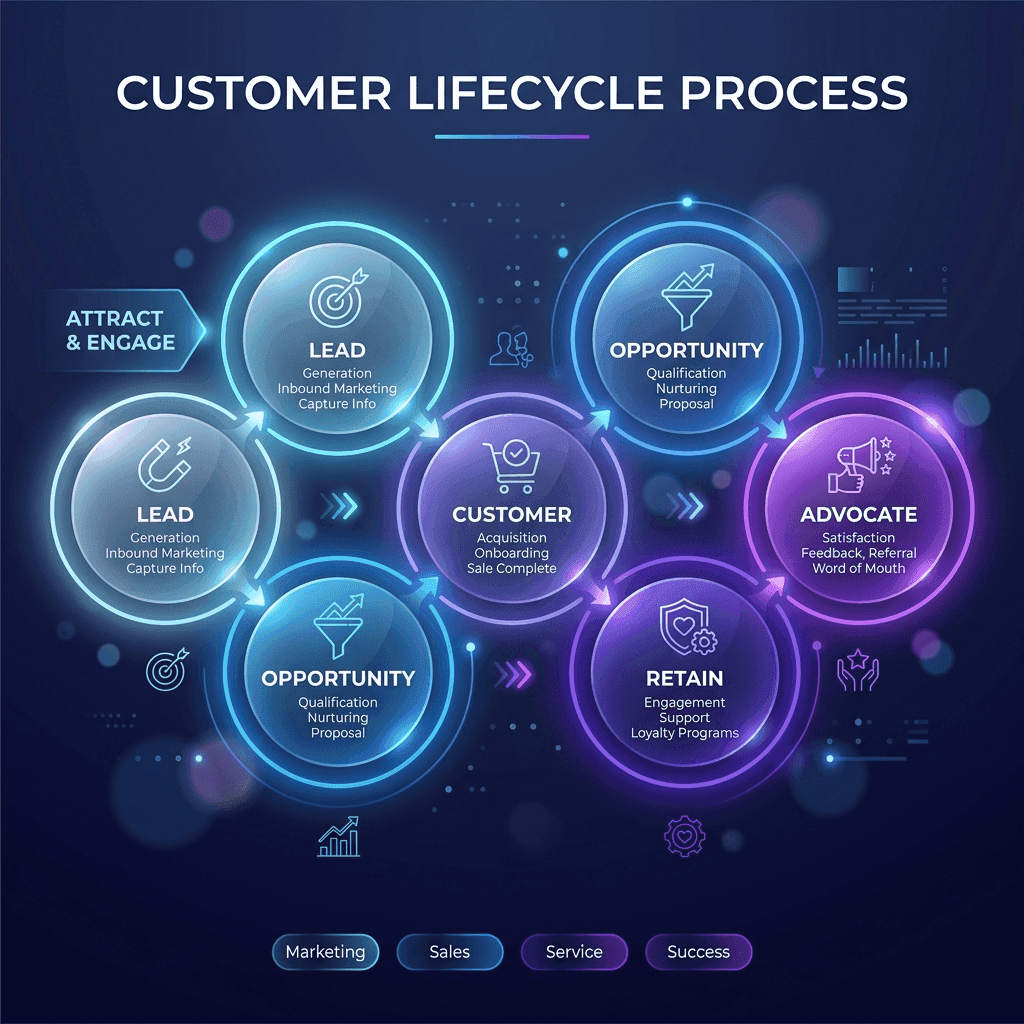
The Complete
Customer Lifecycle
Managing customer relationships has become significantly more complex as businesses grow. Zoho CRM enables organizations to manage the complete customer lifecycle from a single, intelligent connected system.
Lead Generation & Qualification
Capture website visitors and inquiries, instantly converting them into qualified leads ready for your sales team.
Opportunity & Negotiation
Track proposals, meetings, and complex negotiations through a structured sales pipeline until the deal is won.
Support, Retention & Growth
Deliver excellent post-sale support, effortlessly manage renewals, and identify key opportunities for upsells.
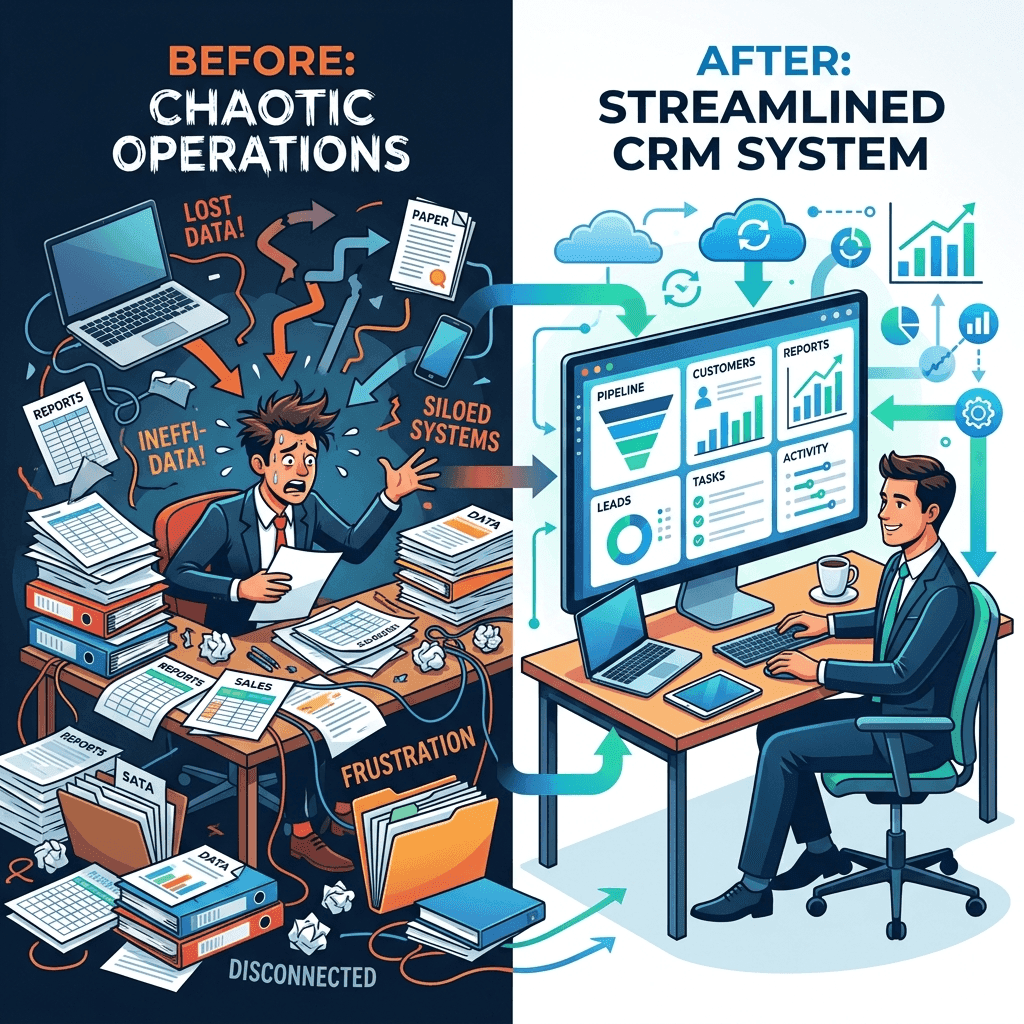
Business Challenges Zoho CRM Solves
Move from chaotic spreadsheets and disconnected systems to a streamlined, intelligent business platform.
Leads Are Getting Lost
Centralize lead capture and ensure fast, consistent follow-ups.
Lack Pipeline Visibility
Gain structured views of opportunities and forecast revenue effectively.
Scattered Information
Consolidate customer data into a single, accessible record.
Manual Follow-Ups
Automate repetitive administrative tasks and focus on selling.
Departments Work in Silos
Connect sales, marketing, finance, and support on a unified platform.
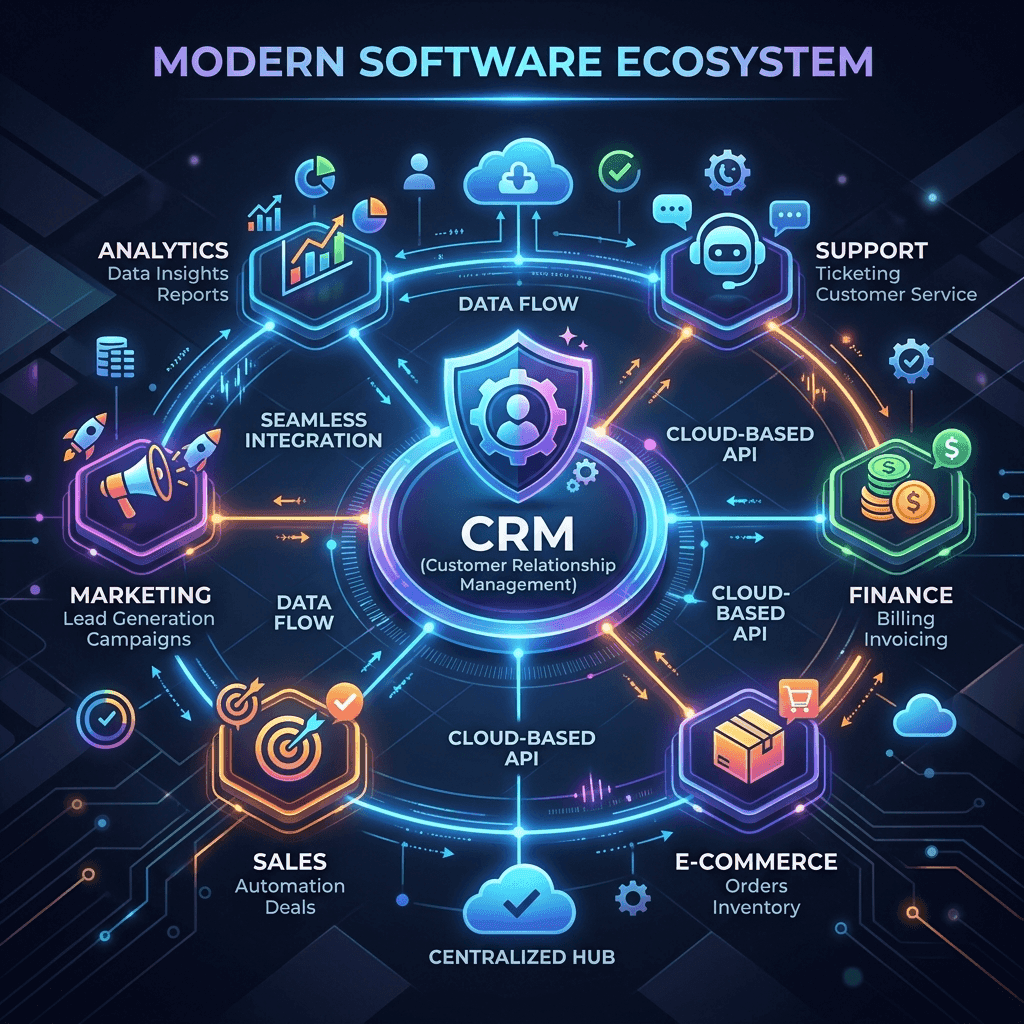
Zoho CRM Within the Ecosystem
Zoho CRM acts as the operational hub connecting sales, finance, support, and analytics.
Complete Zoho CRM Modules Explained
Zoho CRM is organized into modules, each designed to manage a specific stage of the customer journey or business process.
Leads
Capture and manage new business opportunities.
Contacts
Maintain complete customer information.
Accounts
Manage B2B business relationships.
Deals
Track revenue opportunities and pipelines.
Activities
Organize daily sales work (Calls, Meetings).
Products
Manage your product catalogue and pricing.
Quotes & Orders
Create professional sales quotations and orders.
Invoices
Manage billing seamlessly integrated with CRM.
Campaigns
Track marketing attribution and engagement.
Reports & Dashboards
Real-time executive insights and data reporting.
Blueprints
Standardize and enforce business processes.
Workflow Automation
Reduce repetitive manual work via automation.
Example Enterprise Sales Pipeline
Build a Structured Sales Pipeline
A sales pipeline is more than a list of opportunities. It is a structured representation of how potential customers progress from their first interaction to becoming long-term customers.
Without a clearly defined pipeline, sales teams often rely on personal methods, inconsistent follow-up, and manual tracking. Zoho CRM enables organizations to design pipelines that reflect their actual sales processes.
Benefits of a Structured Pipeline
- Improve Opportunity Visibility
- Improve Revenue Forecasting
- Standardize the Sales Process
- Identify Bottlenecks
How Zoho CRM Creates Measurable Business Value
Investing in a CRM platform is about improving how your organization attracts, manages, serves, and retains customers.
Single Source of Customer Information
Consolidate customer information into one platform, enabling authorized teams to access relevant customer history easily.
Improve Sales Productivity
Automate repetitive tasks and provide structured sales processes to help teams focus on relationship building.
Improve Decision-Making
Real-time dashboards and reports that help management understand pipeline health and sales activity.
Strengthen Customer Relationships
With complete visibility, teams can respond more effectively and deliver a more personalized experience.
Turn Your CRM into a Growth Platform
Our consultants work with organizations to design Zoho CRM solutions that improve sales operations, customer management, reporting, and long-term scalability.
Automate Business Processes Without Losing Control
As businesses grow, manual processes become increasingly difficult to manage. Routine activities such as lead assignment, follow-up reminders, approvals, notifications, and status updates consume valuable time while increasing the likelihood of human error.
Zoho CRM enables organizations to automate repetitive business activities while maintaining governance, visibility, and accountability. Rather than replacing human decision-making, automation supports employees by handling predictable, rule-based tasks and ensuring that critical business processes are executed consistently.
Why Workflow Automation Matters
Without automation, organizations commonly experience:
- Delayed follow-ups
- Missed approvals
- Inconsistent customer communication
- Manual task creation
- Duplicate work
- Process bottlenecks
- Limited operational visibility
Workflow automation helps organizations standardize execution while allowing employees to focus on higher-value customer interactions.
What Can Be Automated?
Sales
- Lead assignment
- Deal creation
- Follow-up reminders
- Opportunity progression
- Quote approvals
- Task creation
Marketing
- Lead nurturing
- Campaign follow-up
- Customer segmentation
- Email sequences
Customer Support
- Ticket creation
- Escalation notifications
- SLA reminders
- Customer updates
Management
- Approval routing
- Executive notifications
- Performance alerts
- Dashboard updates
Workflow Automation Lifecycle
Business Event
Trigger
Business Rule
Validation
Workflow Action
Notification
Approval
Record Update
Reporting & Audit
Business Event
A customer action or business milestone occurs.
Practical Example
Example: A prospect submits a demo request form on the website.
Blueprint: Standardize Every Business Process
Instead of allowing users to update records freely, a Blueprint guides them through approved stages while enforcing mandatory actions, approvals, and validations.
Enforce Required Fields and documents before moving to the next stage.
Trigger Approval Requirements for exit conditions.
Assign Responsible Owner at each transition.
Automation Use Cases
Lead Assignment
- Geography
- Product interest
- Industry
- Sales territory
- Round-robin allocation
- Named accounts
Follow-Up Management
- First response
- Demo scheduling
- Proposal submission
- Renewal discussions
- Customer reviews
Approval Automation
- Discounts
- Commercial approvals
- Contract reviews
- Pricing exceptions
- Executive approvals
Customer Communication
- Welcome emails
- Meeting confirmations
- Proposal notifications
- Renewal reminders
- Customer satisfaction surveys
Internal Notifications
- High-value deals created
- Opportunities become inactive
- Escalations occur
- Approvals are pending
- Major milestones reached
Governance
- Role-based permissions
- Approval workflows
- Audit logging
- Validation rules
- Controlled stage transitions
Automation Execution
Common Automation Mistakes
- Automating inefficient processes
- Creating too many workflows
- Poorly defined triggers
- Excessive notifications
- Missing approval controls
- Limited documentation
- No governance model
Automation Best Practices
- Map existing processes before automation
- Remove unnecessary steps
- Define clear business rules
- Automate repetitive activities first
- Test workflows thoroughly
- Train users on new processes
- Monitor workflow performance
- Review automation regularly
What is Workflow Automation in Zoho CRM?
Workflow Automation in Zoho CRM allows businesses to automate repetitive, rule-based activities such as lead assignment, follow-ups, approvals, notifications, and record updates. Blueprints add governance by guiding records through predefined business stages with mandatory validations and approvals, helping organizations improve consistency, efficiency, and compliance.
Automate Your Sales Process with Confidence
Our consultants help organizations design business-driven automations, configure Blueprints, and implement Zoho CRM workflows that improve efficiency while maintaining governance.
Connect Zoho CRM with the Applications That Power Your Business
Modern businesses rarely operate using a single software platform. Sales, finance, marketing, customer support, HR, operations, and management often rely on multiple business applications to perform their daily work.
Zoho CRM is designed to become the central customer intelligence platform by connecting with the broader Zoho ecosystem and third-party applications through native integrations, APIs, middleware, and custom development.
Why CRM Integration Matters
When these systems do not communicate with each other, organizations experience duplicate data entry, inconsistent reporting, delayed processes, and reduced operational visibility.
Enterprise Integration Architecture
Visual demonstration of CRM as the operational hub
Zoho Ecosystem Integration
One of Zoho CRM's biggest strengths is its ability to work seamlessly with other Zoho applications.
| Zoho Product | Business Purpose |
|---|---|
| Zoho Books | Finance & Accounting |
| Zoho Desk | Customer Support |
| Zoho Projects | Project Delivery |
| Zoho Analytics | Business Intelligence |
| Zoho Flow | Workflow Integration |
| Zoho Sign | Digital Signatures |
| Zoho SalesIQ | Live Chat & Visitor Tracking |
| Zoho Campaigns | Email Marketing |
| Zoho Inventory | Inventory Management |
| Zoho People | HR Management |
| Zoho Creator | Custom Applications |
Third-Party Business Integrations
Many organizations rely on external applications. Zoho CRM integrates across multiple software categories.
- ERP solutions
- Accounting software
- Payment gateways
API Integration
Businesses often require data exchange with internal or external applications.
- Customer sync
- Order sync
- Invoice sync
- Lead capture
- Website integration
- Mobile apps
- Partner portals
- Vendor portals
Data Synchronization
Organizations should define integration parameters to maintain consistent and trustworthy information:
- Which system owns the data.
- Synchronization frequency.
- Conflict resolution rules.
- Error handling procedures.
- Security controls.
- Audit requirements.
Integration Scenarios & Strategy
Sales + Finance
CRM opportunities automatically create customer records for downstream financial processes.
CRM + Customer Support
Support teams gain access to sales history while sales teams can view active service issues.
CRM + Marketing
Marketing engagement data enriches customer profiles and supports lead nurturing.
CRM + Operations
Confirmed opportunities trigger downstream operational processes.
CRM + Executive Reporting
Business data from multiple systems contributes to unified dashboards.
Integration Best Practices
- Business process analysis
- Integration architecture design
- Data mapping
- API assessment
- Security review
- Testing strategy
- Monitoring
- Ongoing maintenance
Common Integration Challenges
- Duplicate customer records
- Inconsistent identifiers
- Poor API governance
- Missing validation
- Security gaps
- Limited monitoring
- Legacy system constraints
Can Zoho CRM integrate with other business applications?
Yes. Zoho CRM supports integration with the broader Zoho ecosystem and many third-party applications through native connectors, APIs, middleware, and custom development. Common integrations include finance systems, customer support platforms, marketing tools, productivity suites, communication platforms, ERP systems, and e-commerce applications.
Build a Connected Business Platform
Your CRM should work with the rest of your business—not in isolation. Our consultants help design secure, scalable integration architectures.
Customize Zoho CRM Around Your Business Processes
Every business has its own sales process, approval hierarchy, and reporting requirements. Zoho CRM provides extensive capabilities that allow organizations to align the platform with their operations while maintaining scalability.
Configuration vs Customization
One of the most common mistakes is customizing features that could be handled through standard configuration. Our approach minimizes technical debt:
What Can Be Customized?
Data Structure
- Custom modules
- Custom fields
- Related lists
- Lookup relationships
User Experience
- Role-based layouts
- Custom buttons
- Client scripts
- Dynamic forms
Business Logic
- Workflow rules
- Approval processes
- Blueprint transitions
- Assignment rules
Reporting
- Custom dashboards
- Department reports
- Executive KPIs
- Operational metrics
Industry-Specific Layouts & Fields
Layouts can be adapted so users only see fields relevant to their role and industry. Custom modules allow businesses to manage unique entities like equipment, franchises, or compliance records.
Custom Fields
Custom Modules
Advanced Logic with Deluge
For advanced requirements, Zoho CRM supports custom business logic through Deluge scripting.
- Complex workflow logic
- External API interactions
- Automated document generation
- Record synchronization
Low Code Development: CRM + Zoho Creator
Some business requirements extend beyond CRM. Zoho Creator can be used alongside Zoho CRM to develop custom applications while CRM remains the customer hub.
Zoho CRM
The Customer Hub
Zoho Creator
Specialized Workflows
Can Zoho CRM be customized?
Yes. Zoho CRM supports extensive customization through configuration, custom modules, fields, workflows, Blueprints, client scripts, Deluge scripting, APIs, and integration with Zoho Creator. The most effective approach is to use standard configuration wherever possible and introduce custom development only when necessary.
Build a CRM That Matches the Way You Work
Whether you need advanced automation, custom modules, integrations, or low-code applications, NuageCX can help design a scalable solution.
Zoho CRM Implementation That Aligns Technology with Business Growth
Implementing a CRM is more than configuring software. It is the process of redesigning how your organization captures leads, manages customer relationships, executes sales processes, collaborates across departments, and measures business performance.
A successful implementation combines business consulting, process design, configuration, data migration, integrations, user training, governance, and continuous optimization.
At NuageCX, every Zoho CRM implementation begins with understanding your business—not your software requirements. Our goal is to design a CRM platform that supports measurable business outcomes while remaining scalable as your organization grows.
Our Zoho CRM Implementation Methodology
Phase 1 - Business Discovery
Every successful CRM implementation starts with understanding the business. During discovery, we work with key stakeholders to understand: Business objectives, Sales methodology, Customer lifecycle, Current systems, Reporting requirements, Growth plans, and Operational challenges.
Deliverables
- Discovery documentation
- Current process assessment
- Requirement summary
- Project scope
Client Success
"NuageCX completely transformed how our sales team operates. Their focus on our business process before touching the software made all the difference in user adoption."
Free Implementation Checklist
Download our comprehensive 50-point checklist for planning a successful Zoho CRM rollout.
Implementation Deliverables
| Phase | Key Deliverables |
|---|---|
| Discovery | Business assessment |
| Design | Solution architecture |
| Configuration | CRM setup |
| Development | Customizations |
| Integration | Connected systems |
| Migration | Clean business data |
| Testing | Validated solution |
| Training | User enablement |
| Go Live | Production deployment |
| Hypercare | Post-launch support |
| Optimization | Continuous improvements |
Why Businesses Choose NuageCX
Our implementation approach combines multiple disciplines to ensure a holistic solution:
- Business consulting
- Solution architecture
- CRM implementation
- Process optimization
- Workflow automation
- Integration services
- User adoption
- Executive reporting
- Long-term support
What does a Zoho CRM implementation include?
A Zoho CRM implementation typically includes business discovery, process mapping, solution design, CRM configuration, customization, integrations, data migration, testing, user training, production deployment, post-go-live support, and continuous optimization. A structured implementation approach helps organizations improve adoption, governance, and long-term business value.
Start Your Implementation with Confidence
Whether you're replacing spreadsheets, migrating from another CRM, or expanding an existing Zoho deployment, our consultants can help you design and implement a CRM solution aligned with your business objectives.
Why Some CRM Implementations Deliver Results While Others Fail
A CRM implementation is not simply a software deployment. It is an organizational transformation initiative that affects people, processes, technology, reporting, governance, and customer experience.
Many CRM projects fail not because the software lacks capabilities, but because implementation focuses only on technical configuration instead of business transformation. Successful CRM implementations combine executive sponsorship, clearly defined business objectives, process alignment, user adoption, governance, and continuous improvement.
At NuageCX, every CRM engagement is designed to create measurable business value rather than simply delivering a configured application.
CRM Success Framework
This framework reinforces that CRM is an ongoing business capability.
Common Reasons CRM Projects Fail
Poor Business Process Definition
Many organizations attempt to automate existing processes without first evaluating whether those processes are efficient.
Lack of Executive Sponsorship
CRM adoption requires leadership support.
Weak User Adoption
The most advanced CRM platform provides little value if employees continue using spreadsheets or personal tracking methods.
Poor Data Quality
Migrating incomplete or inaccurate customer data into a CRM creates long-term reporting and operational challenges.
Excessive Customization
Every customization increases future maintenance.
No Governance
Without governance: Processes become inconsistent, reporting quality declines, user adoption decreases, data quality deteriorates.
CRM Maturity Model
This positions CRM as a journey rather than a one-time project. Track your organization's progress:
Spreadsheets
Customer information managed in spreadsheets
Basic CRM
Basic CRM implementation
Standardized Processes
Standardized sales processes
Workflow Automation
Workflow automation and integrations
AI-Assisted CRM
AI-assisted CRM with advanced analytics
Enterprise Intelligence
Enterprise-wide customer intelligence platform
Critical Success Factors
Successful CRM initiatives typically include:
How NuageCX Delivers Successful CRM Projects
Every implementation follows principles that prioritize long-term value:
- Business-first discovery
- Process-driven design
- Configuration before customization
- Governance and security planning
- Structured data migration
- Comprehensive user training
- Executive dashboards
- Post-go-live optimization
- Ongoing advisory support
CRM Readiness Checklist
Evaluate your organization's preparedness before starting implementation.
What makes a Zoho CRM implementation successful?
A successful Zoho CRM implementation combines business process alignment, executive sponsorship, user adoption, structured governance, quality data, appropriate configuration, ongoing optimization, and continuous measurement. Software alone does not determine project success—implementation strategy and organizational adoption are equally important.
Build a CRM That Delivers Long-Term Business Value
Technology is only one part of a successful CRM strategy. Partner with NuageCX to design, implement, and continuously improve a Zoho CRM solution that supports sustainable business growth.
Zoho CRM Solutions Designed for Every Industry
Every industry follows different sales cycles, approval processes, customer journeys, reporting requirements, and operational workflows. A successful CRM implementation reflects these differences instead of applying the same configuration to every business.
NuageCX designs industry-specific Zoho CRM solutions that align with operational requirements, customer engagement models, compliance considerations, and growth objectives. Our approach focuses on configuring CRM around the way your business operates while maintaining scalability and governance.
Industry Solution Framework
Manufacturing
Common Challenges
- Managing dealer and distributor networks
- Tracking RFQs and quotations
- Monitoring long sales cycles
- Coordinating sales with production
- Limited visibility into customer communication
- Manual quotation processes
CRM Capabilities
- Dealer and distributor management
- RFQ tracking
- Opportunity management
- Quote approvals
- Integration with ERP
- Sales forecasting
- Production coordination
- Executive dashboards
Suggested Integrations
Departments Involved
Why Industry Expertise Matters
A generic CRM implementation rarely delivers optimal results because business processes differ significantly across industries.
NuageCX begins each engagement by understanding:
- Sales methodology
- Customer lifecycle
- Operational workflows
- Reporting requirements
- Regulatory considerations
- Integration landscape
- Growth objectives
This allows us to configure Zoho CRM in a way that supports industry-specific processes while remaining flexible for future expansion.
Recommended Zoho Stack
| Industry | Recommended Products |
|---|---|
| Manufacturing | Zoho CRM, Books, Inventory, Projects, Analytics |
| Healthcare | Zoho CRM, Desk, Forms, Analytics, Sign |
| Engineering | Zoho CRM, Projects, Books, Analytics |
| Retail | Zoho CRM, Commerce, Campaigns, SalesIQ, Analytics |
| Distribution & Wholesale | Zoho CRM, Inventory, Books, Flow |
| Professional Services | Zoho CRM, Projects, Sign, Books, Analytics |
Which industries can use Zoho CRM?
Zoho CRM is suitable for organizations across manufacturing, healthcare, engineering, retail, distribution, and professional services. The platform can be configured to match industry-specific sales processes, customer journeys, reporting requirements, and operational workflows, making it adaptable to a wide range of business models.
Find the Right Solution for Your Industry
Every industry has unique operational requirements. Our consultants help organizations design industry-specific Zoho CRM solutions that improve customer management, streamline processes, and support long-term business growth.
Enterprise Grade Security, Compliance & Governance with Zoho CRM
Customer information is one of the most valuable assets an organization manages. Sales records, customer communications, commercial proposals, contracts, pricing information, and business intelligence all require appropriate protection throughout their lifecycle.
A successful CRM implementation is not only about functionality—it must also support security, governance, compliance, and controlled access to business information.
At NuageCX, security is incorporated into the implementation lifecycle from the solution design stage rather than being added after deployment.
Why CRM Security Matters
Organizations often store sensitive information within their CRM, including:
Without appropriate controls, businesses may face unauthorized access, inconsistent data handling, operational risks, and compliance challenges.
Role Based Access Control (RBAC)
Not every employee requires access to all customer information. Zoho CRM allows organizations to define access based on responsibilities.
Security & Access Capabilities
Data Governance Framework
Each stage involves specific responsibilities and recommended controls.
Data Quality Controls
Reliable reporting depends on reliable information.
- Mandatory fields
- Validation rules
- Duplicate prevention
- Standard naming conventions
- Ownership assignment
- Periodic data reviews
Compliance Considerations
Compliance requirements vary by industry and geography. Examples include:
- Customer consent management
- Data retention policies
- Access logging
- Role-based permissions
- Information governance
- Regional privacy requirements
Specific compliance obligations should always be assessed in consultation with legal and compliance teams.
Security Best Practices
- Apply the principle of least privilege.
- Review user access regularly.
- Enable appropriate authentication controls.
- Monitor administrative changes.
- Validate data quality periodically.
- Document configuration changes.
- Train users on secure CRM usage.
- Review integrations for security implications.
Backup & Business Continuity
Planning reduces operational disruption and aids recovery.
- Data backup strategy
- Recovery procedures
- Administrative documentation
- Configuration management
- Change tracking
- Disaster recovery planning
Why NuageCX?
Security is not treated as a final implementation task. During every CRM project, NuageCX incorporates:
This helps organizations deploy Zoho CRM with governance and long-term maintainability in mind.
CRM Security Checklist
Download our comprehensive checklist to evaluate your organization's CRM security posture.
Is Zoho CRM secure for enterprise use?
Zoho CRM provides administrative capabilities such as role-based access, profiles, field-level permissions, audit logging, authentication controls, and governance features that organizations can configure to support secure customer relationship management. Overall security depends on both the platform's capabilities and how the organization designs, configures, and manages its CRM environment.
Build a Secure CRM Foundation for Long-Term Growth
Protecting customer information requires more than software—it requires thoughtful governance, well-defined access controls, and a structured implementation approach.
Accelerate Smarter Business Decisions with Zoho Zia AI
Artificial Intelligence is transforming how businesses manage customer relationships, prioritize opportunities, forecast revenue, and support decision-making. Rather than replacing sales teams, AI helps them focus on high-value activities by providing recommendations, identifying patterns, and surfacing insights from business data.
Within Zoho CRM, Zia is the AI-powered assistant that supports users with predictive insights, intelligent recommendations, automation assistance, and analytical capabilities.
At NuageCX, AI is implemented with a clear business objective: helping organizations make faster, more informed decisions while maintaining human oversight and governance.
What is Zoho Zia?
Zoho Zia is the artificial intelligence capability within the Zoho ecosystem that assists users by analyzing CRM data, identifying trends, supporting forecasting, and providing contextual recommendations.
Depending on the Zoho edition, enabled features, and data quality, Zia can help organizations improve visibility into sales activities and customer engagement.
Where AI Adds Value
AI becomes most effective when organizations have consistent CRM adoption and reliable data. Typical areas include:
Sales
- Opportunity prioritization
- Revenue forecasting
- Activity recommendations
- Pipeline insights
Management
- Executive summaries
- Business trend analysis
- Performance monitoring
Customer Engagement
- Communication insights
- Follow-up suggestions
- Customer behaviour analysis
Operations
- Process optimization
- Workflow recommendations
- Data quality assistance
Intelligent CRM Capabilities
AI Sales Intelligence
Rather than treating every opportunity equally, AI can assist by identifying patterns that indicate opportunities requiring attention, delayed follow-ups, pipeline risks, activity gaps, and engagement trends.
Predictive Sales Forecasting
AI-assisted forecasting supports leadership by highlighting revenue trends, pipeline changes, sales velocity, opportunity movement, and seasonal patterns.
AI Lead Prioritization
When organizations receive many enquiries, AI assists with lead prioritization, engagement analysis, behaviour trends, qualification support, and sales recommendations.
Intelligent Dashboards
AI helps interpret information rather than just displaying it. Examples: pipeline health summaries, performance trends, productivity insights, and executive recommendations.
Conversation Intelligence
Where supported, AI assists with email analysis, communication trends, meeting summaries, sentiment indicators, and activity recommendations.
Workflow Recommendations
AI supports continuous improvement by highlighting frequently repeated tasks, manual bottlenecks, workflow opportunities, and process optimization ideas.
AI Readiness Framework
Track your organization's journey from disconnected spreadsheets to a predictive enterprise.
Level 1: Spreadsheets
Customer information managed in disconnected files.
Common AI Use Cases
| Business Function | AI Application |
|---|---|
| Sales | Opportunity prioritization |
| Marketing | Customer segmentation |
| Leadership | Forecasting & insights |
| Customer Success | Renewal analysis |
| Operations | Process optimization |
| Management | Executive dashboards |
Why NuageCX?
Successful AI implementation depends on more than enabling features. NuageCX helps organizations align AI with business processes.
What is Zoho Zia?
Zoho Zia is the AI capability within Zoho CRM that helps businesses analyze CRM data, support forecasting, identify trends, prioritize opportunities, and provide intelligent recommendations. Its effectiveness depends on high-quality CRM data, well-defined business processes, and appropriate governance.
Prepare Your Business for AI-Powered CRM
Artificial Intelligence delivers the greatest value when built on reliable data, structured processes, and thoughtful implementation.
Make Better Business Decisions with Real Time CRM Analytics & Executive Dashboards
Data only becomes valuable when it helps organizations make better decisions. Many businesses generate significant amounts of customer, sales, marketing, and operational data but struggle to convert that information into actionable insights. Reports are often prepared manually, decision-making is delayed, and leadership lacks visibility into business performance.
Zoho CRM provides reporting and dashboard capabilities that help organizations monitor sales activities, customer engagement, pipeline health, team productivity, and revenue trends from a centralized platform.
At NuageCX, we design dashboards around business objectives so every report answers an important operational or strategic question.
Why CRM Analytics Matters
Every business leader wants answers such as:
Executive Dashboard
Monthly Revenue
Sales Pipeline Value
Lead Conversion Rate
Win Rate
Average Sales Cycle
Top Performing Rep
Top Lead Sources
Pending Follow-ups
Opportunity Ageing
Forecast vs Actual
Sales Performance Dashboard
Recommended KPIs include:
Marketing Analytics
Marketing teams require insight into campaign effectiveness. Useful reports include:
- Leads by source
- Campaign performance
- Conversion rates
- Cost per lead
- Marketing qualified leads
- Sales qualified leads
- Landing page performance
- Customer acquisition trends
Customer Analytics
CRM should also support long-term customer management. Examples include:
- Active customers
- Customer segmentation
- Renewal pipeline
- Upsell opportunities
- Customer engagement
- Account growth
- High-value customers
- Churn indicators
Executive KPI Framework
Sales
Win rate, pipeline value, average deal size
Marketing
Lead quality, campaign conversion, lead source
Customer Success
Retention, renewal, engagement
Finance
Revenue, forecast accuracy, collections visibility
Operations
Response time, workflow completion, SLA performance
Leadership
Business growth, performance trends, strategic KPIs
Forecasting & Trend Analysis
Good forecasting combines CRM discipline with reliable data. Organizations should monitor:
- Monthly revenue trends
- Quarterly forecasts
- Sales velocity
- Seasonal demand
- Opportunity movement
- Revenue realization
- Forecast accuracy
Custom Reports
NuageCX designs custom reports for:
- Sales leadership
- Marketing teams
- Operations
- Finance
- Customer Success
- Executive management
Zoho CRM + Zoho Analytics
For advanced business intelligence, CRM can be extended with Zoho Analytics. This enables:
- Cross-functional dashboards
- Data blending
- Trend analysis
- Executive scorecards
- Interactive visualizations
- Multi-source reporting
Reporting Best Practices
- Define KPIs before building dashboards.
- Focus on actionable metrics.
- Eliminate duplicate reports.
- Review dashboards regularly.
- Standardize metric definitions.
- Validate data quality.
- Train users on report interpretation.
Common Reporting Challenges
- Too many reports with little value.
- Inconsistent KPI definitions.
- Manual spreadsheet reporting.
- Poor data quality.
- Lack of executive visibility.
- Delayed decision-making.
KPI Dashboard Template
Download our free KPI mapping template to align your reporting with your business objectives.
Why NuageCX?
Our reporting approach focuses on business outcomes rather than technical implementation. We help organizations:
What reports and dashboards does Zoho CRM provide?
Zoho CRM supports reports and dashboards for sales, marketing, customer management, forecasting, executive performance, and operational analytics. Organizations can create standard and custom reports to monitor KPIs, track business performance, improve forecasting, and make data-driven decisions. Advanced analytics capabilities can be extended through Zoho Analytics for deeper business intelligence.
Turn CRM Data into Business Intelligence
Your CRM should do more than store customer information. It should provide the insights needed to improve performance, optimize processes, and support strategic growth.
Empower Your Sales Teams with Mobile CRM & Real Time Customer Access
Modern sales teams are no longer confined to office environments. Sales representatives, account managers, business development executives, field service teams, and consultants frequently work from customer locations, manufacturing facilities, project sites, trade exhibitions, and remote offices.
Without secure access to customer information while on the move, employees often depend on handwritten notes, delayed updates, and disconnected communication. This can reduce productivity, affect customer experience, and limit management visibility.
Zoho CRM provides mobile access that allows authorized users to manage customer relationships, update opportunities, record activities, and access critical business information from supported mobile devices.
Why Mobile CRM Matters
Business decisions increasingly happen outside the office. Examples include:
- Customer meetings
- Factory visits
- Dealer visits
- Distributor meetings
- Site inspections
- Trade exhibitions
- Sales presentations
- Business travel
Mobile CRM Capabilities
Customer Management
- View customer information
- Access communication history
- Review previous meetings
- Update customer records
Sales Activities
- Create opportunities
- Update pipeline stages
- Log meetings
- Record calls
- Schedule follow-ups
- Capture notes
Productivity
- Manage daily tasks
- View reminders
- Access dashboards
- Monitor targets
The exact capabilities available depend on the Zoho CRM edition, user permissions, and configuration.
Field Sales Workflow
Interactive journey showing how mobile CRM connects field actions to operational visibility.
Morning Dashboard
User Action
Review daily targets & schedule.
CRM Update
No update required.
Automation Triggered
None
Business Benefit
Field rep starts the day with clear priorities.
Territory Management
Organizations with regional sales teams often require structured territory management.
- • Regional assignments
- • Area-wise reporting
- • Sales ownership
- • Territory dashboards
Visit Management
Field teams frequently visit customers throughout the day.
- • Meeting scheduling
- • Visit tracking
- • Discussion summaries
- • Opportunity updates
Real Time Collaboration
Mobile CRM helps keep office and field teams connected.
- • Management approvals
- • Internal comments
- • Task assignments
- • Sales updates
Executive Visibility
Leadership benefits from real-time field activity dashboards.
- • Visits completed
- • Meetings conducted
- • Territory revenue
- • Sales activity trends
Offline Productivity
Some organizations operate in environments with limited internet connectivity. Where supported by the platform, users can continue working with available offline capabilities and synchronize updates once connectivity is restored.
Mobile CRM Best Practices
- Define mobile usage policies
- Secure user devices
- Apply role-based permissions
- Train field teams
- Standardize meeting notes
- Review activity dashboards regularly
- Protect customer information
Common Challenges
Businesses without structured mobile CRM often experience:
- Delayed CRM updates
- Incomplete meeting records
- Lack of field visibility
- Manual reporting
- Duplicate customer notes
- Communication gaps between office and field teams
Why NuageCX?
Mobile CRM should support real business operations—not simply replicate the desktop interface.
Can Zoho CRM be used on mobile devices?
Yes. Zoho CRM provides mobile access that allows authorized users to manage customer information, opportunities, meetings, activities, and dashboards from supported mobile devices. Mobile CRM helps field teams stay productive, maintain accurate records, and collaborate with office-based colleagues in real time while following organizational security and governance policies.
Equip Your Sales Team with Mobile CRM
Give your field teams secure, real-time access to customer information, sales opportunities, and business insights—wherever they work.
Migrate to Zoho CRM with Confidence While Protecting Your Business Data
Migrating to a new CRM is more than transferring records from one platform to another. It is an opportunity to improve data quality, simplify business processes, eliminate duplicate information, and establish a stronger foundation for future growth.
Whether your organization currently manages customer information in spreadsheets, a legacy CRM, or another cloud platform, a structured migration approach helps reduce operational disruption while preserving critical business information.
At NuageCX, migration projects combine business analysis, data preparation, validation, testing, and user adoption planning to support a smooth transition to Zoho CRM.
When Should You Consider CRM Migration?
Organizations typically migrate when they experience challenges that limit productivity and performance:
Migration should always be driven by business objectives rather than technology alone.
Supported Migration Scenarios
Spreadsheet to Zoho CRM
Suitable for organizations managing customer information through Excel or Google Sheets.
Typical items & datasets migrated:
Our CRM Migration Framework
Migration Phases
Phase 01 – CRM Assessment
We begin by understanding your current CRM platform, business objectives, data structure, customizations, integrations, reporting requirements, and user groups.
Objective
Determine migration scope and identify opportunities for process improvement.
Deliverables
- Migration Scope Document
- System Architecture Mapping
Risks
Underestimating legacy customization complexity.
Validation Checkpoint
Stakeholder alignment on migration goals.
Data Validation Checklist
Verify all data migration integrity steps interactively:
Migration Best Practices
Successful CRM migrations generally include:
- Define clear migration objectives.
- Clean data before migration.
- Test with representative datasets.
- Validate relationships between records.
- Train users before go-live.
- Maintain rollback plans.
- Document every migration step.
- Monitor adoption after deployment.
Common Migration Challenges
- Duplicate customer records
- Missing historical activities
- Incorrect field mapping
- Broken integrations
- Incomplete user training
- Poor data quality
- Downtime concerns
Why NuageCX?
Migration is treated as a business transformation project rather than a technical exercise.
How do you migrate to Zoho CRM?
A successful Zoho CRM migration includes assessing the current system, auditing and cleansing data, mapping fields, testing the migration, validating records, deploying to production, training users, and optimizing the CRM after go-live. Careful planning helps protect data quality, reduce operational disruption, and improve long-term CRM adoption.
Planning a CRM Migration?
Whether you're moving from spreadsheets, Salesforce, HubSpot, Microsoft Dynamics, or another CRM platform, NuageCX can help you plan and execute a structured migration with minimal disruption.
Zoho CRM vs Salesforce: Which CRM Is Right for Your Business?
Selecting the right CRM platform is a strategic business decision that affects sales operations, customer management, reporting, automation, integrations, and long-term scalability.
Zoho CRM and Salesforce are both established CRM platforms, but they serve different business needs, budgets, implementation approaches, and organizational structures.
Rather than asking which platform is universally "better," organizations should evaluate which solution aligns more closely with their business processes, growth plans, available resources, and total cost of ownership.
Platform Capability Matrix
Click any row to reveal detailed implementation insights and platform considerations.
| Feature | Zoho CRM | Salesforce |
|---|---|---|
| Deployment | Cloud-based | Cloud-based |
| Ease of Use | Designed for quick adoption | Extensive capabilities with steeper learning curve |
| Customization | Extensive configuration and low-code options | Extensive customization ecosystem |
| Automation | Workflows, Blueprints, AI, integrations | Advanced automation capabilities |
| AI | Zia AI | Einstein AI |
| Ecosystem | Broad Zoho application suite | Extensive AppExchange ecosystem |
| Typical Business Fit | SMEs, mid-market, and many enterprise use cases | Mid-market and large enterprise environments |
| Mobile Access | Yes | Yes |
Which CRM Fits Your Business?
Answer the key strategic question below to determine which platform might align better:
What is your primary software strategy?
When Zoho CRM May Be a Strong Choice
Organizations often evaluate Zoho CRM when they want:
- A unified business platform across CRM, finance, HR, support, and analytics.
- Strong workflow automation.
- Extensive low-code customization.
- Faster implementation.
- A connected Zoho ecosystem.
- Flexible scalability.
When Salesforce May Be Considered
Organizations often evaluate Salesforce when they require:
- Extensive enterprise ecosystem integrations.
- Highly specialized industry implementations.
- Large-scale global deployments.
- Existing investment in the Salesforce platform.
Total Cost of Ownership
Evaluating implementation effort, user licensing, training, custom integrations, and future administration reduces total ownership overhead.
Ease of Adoption
Technology value depends on adoption rates. User experience and clear processes reduce change management complexity.
Automation & AI
Zoho CRM matches processes via Blueprints & Zia. Salesforce relies on Flow Builders & Einstein AI for predictive models.
Scalability
Both platforms scale users, geographic coverage, complexity, and security governance rules relative to future business growth.
Which CRM Should You Choose?
Consider the following structured discovery questions:
Why NuageCX?
Our objective is not simply to implement software. The recommendation is always based on business fit.
Is Zoho CRM better than Salesforce?
Neither platform is universally better. Zoho CRM and Salesforce each offer strong CRM capabilities but differ in ecosystem, implementation approach, customization options, AI capabilities, administrative complexity, and overall business fit. The right choice depends on an organization's processes, growth plans, technical requirements, and implementation objectives.
Not Sure Which CRM Is Right for Your Business?
Choosing the right CRM requires more than comparing feature lists. Our consultants can assess your business processes to recommend the platform that best aligns with your organization.
Zoho CRM vs HubSpot CRM: Which Platform Fits Your Business Growth Strategy?
Zoho CRM and HubSpot CRM are both widely adopted customer relationship management platforms, but they are designed with different strengths, implementation approaches, and business priorities.
HubSpot is well known for its marketing ecosystem and user-friendly interface, while Zoho CRM offers extensive business process customization, workflow automation, and deep integration across the broader Zoho ecosystem.
The right platform depends on your organization's sales processes, marketing requirements, reporting needs, integrations, scalability goals, and long-term technology strategy.
| Capability | Zoho CRM | HubSpot CRM |
|---|---|---|
| Sales Pipeline | ||
| Lead Management | ||
| Workflow Automation | Extensive | Available (varies by edition) |
| AI Features | Zia AI | HubSpot AI capabilities |
| Low-Code Customization | Extensive | Moderate |
| Custom Modules | Limited compared to Zoho CRM | |
| Marketing Integration | Zoho Campaigns & ecosystem | Native HubSpot Marketing Hub |
| Reporting | Advanced | Advanced |
| Mobile App | ||
| API Support |
When Zoho CRM is Typically Selected
Organizations choose Zoho CRM for:
- End-to-end business management.
- Flexible workflow automation.
- Custom business processes.
- Low-code application development.
- Strong integration across finance, HR, support, and operations.
- Long-term scalability within the Zoho ecosystem.
When HubSpot CRM is Often Considered
Organizations often consider HubSpot for:
- Marketing automation.
- Inbound lead generation.
- Content marketing.
- Email marketing.
- Customer engagement.
- Ease of onboarding.
Evaluate Your Core Priority
Select your organization's primary focus to determine the system alignment:
Marketing & Sales
Zoho integrates with Zoho suite tools (Campaigns, SalesIQ). HubSpot offers natively built, content-driven inbound marketing workflows.
Customization
Zoho CRM supports custom modules, Deluge scripting, Client Scripts, and Creator extensions. HubSpot offers moderate layout customization.
Automation Depth
Zoho features Blueprint validation, workflow rules, and approvals. HubSpot matches email sequence, nurturing, and lifecycle events.
Analytics & Scale
Both support pipeline performance, forecasting, and reporting, keeping operations scaling efficiently across user counts.
Which CRM Should You Choose?
Why NuageCX?
NuageCX helps organizations evaluate CRM platforms through structured discovery and business analysis.
Is Zoho CRM better than HubSpot CRM?
Zoho CRM and HubSpot CRM both offer robust CRM capabilities but are optimized for different priorities. Zoho CRM provides extensive customization, workflow automation, and integration across the Zoho ecosystem, while HubSpot is widely recognized for its marketing and inbound sales capabilities. The right choice depends on your business processes, growth strategy, reporting needs, and implementation goals.
Compare CRM Platforms with Expert Guidance
Choosing the right CRM involves evaluating more than features. It requires understanding your processes, technology landscape, and long-term business objectives.
Zoho CRM vs Microsoft Dynamics 365: Choosing the Right CRM for Business Growth
Zoho CRM and Microsoft Dynamics 365 are both powerful customer relationship management platforms, but they are designed to address different business environments, implementation approaches, and technology ecosystems.
Microsoft Dynamics 365 is closely integrated with Microsoft's enterprise ecosystem, while Zoho CRM is part of a broader suite of business applications that emphasizes flexibility, workflow automation, and low-code customization.
Rather than selecting a CRM based on brand familiarity, organizations should evaluate how each platform supports their sales processes, customer management strategy, reporting requirements, integration landscape, and future growth plans.
Interactive Comparison Matrix
Click on any capability row to view the comparison details.
| Capability | Zoho CRM | Microsoft Dynamics 365 |
|---|---|---|
| Cloud Deployment | ||
| Sales Automation | ||
| Workflow Automation | Advanced | Advanced |
| AI Features | Zia AI | Microsoft Copilot AI |
| Low-Code Platform | Zoho Creator | Microsoft Power Platform |
| Business Intelligence | Zoho Analytics | Power BI |
| API Integration | ||
| Mobile CRM | ||
| Multi-Department Support | ||
| Enterprise Scalability |
When Zoho CRM is Preferred
Chosen by organizations seeking:
- Flexible CRM implementation.
- Workflow automation.
- Integrated business applications.
- Low-code development.
- Connected sales, finance, support, and operations.
- Faster deployment.
When Microsoft Dynamics 365 is Selected
Commonly evaluated by organizations that:
- Use Microsoft 365 extensively.
- Standardize on Azure infrastructure.
- Require deep integration with Microsoft business applications.
- Operate large enterprise environments.
- Use Power Platform and Power BI extensively.
Which CRM Fits Your Business?
Choose your current organizational stack setup to evaluate platform suitability:
Ecosystem Mapping
| Capability / Area | Zoho Ecosystem | Microsoft Ecosystem |
|---|---|---|
| CRM / Sales | Zoho CRM | Dynamics 365 Sales |
| Email / Collaboration | Zoho Mail / Cliq | Microsoft 365 / Outlook / Teams |
| Document Storage | Zoho WorkDrive | SharePoint / OneDrive |
| Business Intelligence | Zoho Analytics | Power BI |
| App Integration | Zoho Flow | Power Automate |
| Custom Apps | Zoho Creator | Power Apps |
| Finance / Accounting | Zoho Books | Business Central |
Sales Automation
Both support pipeline management, opportunity tracing, lead assignments, and forecasting. Choose based on system integration.
Customization
Zoho CRM runs on Client Scripts & Deluge. Dynamics utilizes Power Apps, Power Automate, and custom Dataverse entities.
TCO Factors
Evaluate license costs, implementation consultation, support, and administrative overheads for a complete overview.
Security
Enterprise role access, auditing, and compliance are fully covered on both platforms to protect client records.
Which Platform Fits Your Business?
Why NuageCX?
NuageCX approaches CRM selection as a business consulting exercise.
Is Zoho CRM better than Microsoft Dynamics 365?
Zoho CRM and Microsoft Dynamics 365 are both enterprise-capable CRM platforms. Zoho CRM offers extensive workflow automation, low-code customization, and a unified Zoho business ecosystem, while Microsoft Dynamics 365 integrates deeply with Microsoft products such as Microsoft 365, Teams, Power BI, and Azure. The most suitable platform depends on your existing technology stack, business processes, governance requirements, and growth strategy.
Compare CRM Platforms Before You Invest
Selecting the right CRM affects every stage of your customer lifecycle. Our consultants help businesses evaluate technology fit, implementation complexity, integration requirements, and long-term business value before making a CRM investment.
Zoho CRM vs Freshsales: Which CRM Better Supports Your Business Growth?
Zoho CRM and Freshsales are both modern cloud-based customer relationship management platforms that help organizations manage leads, customer relationships, sales opportunities, and business processes.
While both platforms provide core CRM capabilities, they differ in ecosystem breadth, customization options, workflow automation, analytics, and long-term scalability.
Rather than focusing on feature counts alone, organizations should evaluate how each platform aligns with their operational requirements, technology ecosystem, and future business goals.
Feature Comparison Matrix
| Capability | Zoho CRM | Freshsales |
|---|---|---|
| Lead Management | ||
| Contact Management | ||
| Opportunity Management | ||
| Workflow Automation | Advanced | Available |
| Blueprint Process Management | Limited | |
| AI Capabilities | Zia AI | Freddy AI |
| Low-Code Development | Zoho Creator | Limited native equivalent |
| Analytics | Zoho Analytics | Freshworks Analytics |
| API Integration | ||
| Mobile CRM |
When Zoho CRM is Chosen
Commonly selected by organizations looking for:
- End-to-end business management.
- Extensive workflow automation.
- Custom business processes.
- Low-code application development.
- Strong reporting and analytics.
- Broad business ecosystem.
When Freshsales is Considered
Often considered by businesses seeking:
- Sales-focused CRM.
- Built-in communication tools.
- Simpler onboarding.
- Integrated Freshworks ecosystem.
- Straightforward sales management.
CRM Decision Wizard
Choose your primary organizational requirement to see the matching architecture:
Sales Automation
Both support pipeline management, email logs, and task setups. Zoho offers stronger multi-department workflow structures.
Ecosystem Platform
Zoho links CRM to Books, Analytics, and Creator. Freshsales connects directly to Desk, Marketer, and Chat.
Customization
Zoho CRM offers custom modules, Client Scripts, and blueprint routing. Freshsales provides simpler structural layouts.
AI Capabilities
Zoho Zia provides predictions, best contact time, and workflows. Freddy AI handles lead scoring and call logs.
Which CRM Should You Choose?
Why NuageCX?
NuageCX helps organizations evaluate CRM platforms through a structured consulting approach.
Is Zoho CRM better than Freshsales?
Zoho CRM and Freshsales both provide strong CRM capabilities. Zoho CRM offers extensive workflow automation, customization, low-code development, and a broad business application ecosystem, while Freshsales focuses on streamlined sales management within the Freshworks platform. The right choice depends on your business processes, technology ecosystem, reporting requirements, and long-term growth plans.
Compare CRM Platforms with Business Experts
Choosing a CRM should be based on your operational requirements—not marketing comparisons. Our consultants help organizations evaluate CRM platforms, implementation complexity, integrations, and long-term scalability to identify the best fit.
Understand Zoho CRM Pricing, Licensing & Total Cost of Ownership
Choosing a CRM is not only about comparing subscription prices. Organizations should evaluate licensing, implementation, customization, integrations, training, support, and future scalability before making an investment.
While Zoho CRM offers multiple editions to support businesses of different sizes and requirements, selecting the right edition depends on your sales processes, automation needs, reporting requirements, integrations, and long-term growth plans.
At NuageCX, we help businesses choose the most suitable Zoho CRM edition based on business objectives rather than purchasing unnecessary licenses or features.
Beyond Subscription Costs
Many businesses compare only monthly subscription costs, overlooking several critical components of a successful CRM investment:
Zoho CRM Editions
| Edition | Suitable For | Typical Use Cases |
|---|---|---|
| Standard | Small businesses beginning CRM adoption | Lead tracking, contacts, basic sales management |
| Professional | Growing organizations | Workflow automation, sales pipelines, reporting |
| Enterprise | Businesses requiring advanced customization | Blueprint, approvals, advanced automation, governance |
| Ultimate | Organizations needing advanced analytics & enterprise tools | Executive reporting, AI, business intelligence, complex operations |
CRM Project Investment Range Estimator
Configure implementation scope below to receive an estimated range covering configuration, migration, and startup training.
Estimated Project Scope Range
Estimated range includes platform discovery, initial user setups, core configurations, and basic data import.
Choosing the Right Edition
Consider the following business roadmap questions:
- How many users will access the CRM?
- Do you require workflow automation?
- Will multiple departments use the platform?
- Are custom modules required?
- Do you need advanced reporting?
- Will external systems be integrated?
- Do you require approval workflows?
- What are your growth plans over 3 to 5 years?
Hidden Costs Businesses Overlook
Organizations often focus on subscription software licenses while overlooking:
- Poor data quality
- Inefficient business processes
- User adoption challenges
- Integration complexity
- Change management
- Ongoing administration
- Future enhancements
How to Reduce CRM Costs
- Cleaning data before migration.
- Standardizing processes before automation.
- Using native CRM capabilities where possible.
- Limiting unnecessary customization.
- Training users effectively.
- Reviewing CRM usage regularly.
- Implementing governance from the start.
Why NuageCX?
Our recommendations are based on your business requirements—not on selling the highest edition.
How much does Zoho CRM cost?
Zoho CRM pricing varies depending on the edition, number of users, and selected capabilities. Organizations should evaluate not only software licensing but also implementation, customization, integrations, training, and long-term support when estimating the total cost of ownership. The most suitable edition depends on business processes, automation needs, reporting requirements, and future growth plans.
Find the Right Zoho CRM Plan for Your Business
Avoid paying for features you don't need—or choosing an edition that limits future growth. Our consultants help evaluate requirements and draft cost-effective CRM roadmaps.
Estimate the Business Value of Your Zoho CRM Investment
A CRM should be evaluated based on business outcomes rather than software features alone. While automation, dashboards, and workflow improvements are valuable, decision-makers ultimately want to understand how a CRM can contribute to revenue growth, operational efficiency, customer retention, and better decision-making.
A structured ROI assessment helps organizations estimate the potential impact of implementing Zoho CRM based on their current processes, team size, and business objectives.
At NuageCX, we use business metrics—not assumptions—to help organizations evaluate CRM investment opportunities.
Why Measure CRM ROI?
CRM implementations influence multiple areas of a business, validating the business case for adoption:
Interactive ROI Calculator
Step 1 of 4Step 1: Business Profile
Revenue Growth
Better lead qualification, faster follow-ups, opportunity routing, and cross-sell visibility support revenue pipelines.
Productivity Gains
Reduce manual reporting overheads, spreadsheet updates, duplicate entries, status syncs, and manual task logging.
Customer Experience
Maintain relationship consistency, full email logging history, coordination, and support desk transparency.
Executive Decision Making
Accurate sales forecasting, executive KPI tracking, and real-time dashboard analytics support business plans.
ROI Framework
ROI improves through continuous process optimization rather than deployment alone.
Download Business Case Report
Receive a customized PDF report drafted by our CRM consultants based on your calculations:
- ✔ Current maturity assessment
- ✔ Estimated improvement areas
- ✔ Recommended Zoho edition
- ✔ Implementation roadmap & scope
How do you calculate CRM ROI?
CRM ROI is typically evaluated by comparing implementation and operating costs with measurable business improvements such as increased sales productivity, better lead conversion, reduced manual work, improved customer retention, enhanced reporting, and stronger forecasting. A structured ROI assessment should use current business metrics and realistic improvement targets rather than generic assumptions.
Build a Business Case for Zoho CRM
Understand the potential business impact before you invest. Complete the CRM ROI Assessment to receive a personalized report and implementation roadmap prepared by our CRM consultants.
Is Your Business Ready for a Successful Zoho CRM Implementation?
A successful CRM implementation begins long before software is configured. Organizations that achieve the strongest results typically invest time in evaluating their business processes, customer data, operational workflows, reporting requirements, user readiness, and executive objectives before deployment.
The CRM Readiness Assessment helps organizations understand their current maturity, identify implementation risks, and define a practical roadmap for CRM success.
At NuageCX, every implementation starts with a structured readiness assessment to ensure the platform is aligned with business goals from day one.
Why CRM Readiness Matters
Organizations that skip the assessment stage often encounter challenges that delay execution:
CRM Readiness Framework
The Six Pillars
Pillar 1: Business Strategy
Key Assessment Questions
- Are CRM objectives clearly defined?
- What business outcomes are expected?
- Which departments will use the CRM?
- What KPIs will measure success?
- Is executive sponsorship established?
Assessment Review Areas
Business goals, growth strategy, customer lifecycle, sales objectives, reporting expectations
Potential Risk Factors
Lack of strategic direction leading to wasted software features.
CRM Maturity Scorecard
Drag the sliders below to rate your business readiness (1 to 15) for each pillar:
Total Score
Suitable for phased implementation
Assessment Sample Questions
Business & Sales
- • What are CRM objectives?
- • How do you measure sales success?
- • Is your sales process documented?
Marketing & CS
- • How are leads generated?
- • How are renewals managed?
- • Is customer history centralized?
Technology & Gov
- • Which systems require integration?
- • Who owns CRM administration?
- • Are existing reports reliable?
Assessment Deliverables
After completion, users receive a comprehensive package outlining:
Get Your Readiness Report
Download your customized assessment summary containing maturity details, timeline targets, and edition roadmaps:
- ✔ Maturity score executive review
- ✔ Implementation roadmap & timeline
- ✔ Risks & mitigation roadmap
Why NuageCX?
Our CRM Readiness Assessment reduces project risks and improves implementation success metrics.
What is a CRM Readiness Assessment?
A CRM Readiness Assessment evaluates whether an organization's business processes, customer data, technology, governance, and users are prepared for a successful CRM implementation. It helps identify implementation risks, prioritize improvements, and create a roadmap that supports stronger adoption and long-term business value.
Discover How Ready Your Business Is for Zoho CRM
Before investing in CRM implementation, understand your organization's strengths, risks, and opportunities. Complete the CRM Readiness Assessment to receive a personalized roadmap.
A Structured Zoho CRM Implementation Timeline from Discovery to Business Adoption
One of the first questions organizations ask before starting a CRM project is: "How long will implementation take?"
The answer depends on factors such as business complexity, the number of users, existing business processes, required integrations, customizations, data migration, and user adoption requirements.
Rather than following a one-size-fits-all approach, NuageCX develops a structured implementation roadmap with clearly defined milestones, responsibilities, and deliverables. This provides transparency throughout the project while reducing implementation risks.
Interactive Horizontal Roadmap
Select a project milestone to see details on objectives, deliverables, and tasks:
Business Discovery
Objectives
Define project scope, understand business goals, identify stakeholders, confirm priorities.
Customer Responsibilities
Confirm stakeholder availability for workshops.
NuageCX Responsibilities
Draft discovery matrix & structure questions.
Key Deliverables
- Discovery workshop
- Project charter
- Stakeholder matrix
- Initial implementation plan
Success Criteria
Steering committee alignment on goals.
Implementation Milestones Tracker
Check off completed project phases to track rollout progress:
Typical Timelines by Business Size
| Business Size | Typical Duration |
|---|---|
| Small Business | 2–6 weeks |
| Growing Business | 6–10 weeks |
| Mid Market | 8–16 weeks |
| Enterprise | 3–6+ months |
Actual project timelines depend on scope, integrations, customizations, data quality, and stakeholder availability.
Project Governance
Every successful rollout includes:
Common Delay Causes
Projects are often delayed by:
- Changing business requirements
- Incomplete data sets
- Delayed stakeholder approvals
- Limited user availability
- Integration complexity
- Scope expansion
- Poor documentation
Why NuageCX?
NuageCX manages CRM implementations through a structured framework focused on transparency:
How long does a Zoho CRM implementation take?
The implementation timeline depends on business size, process complexity, integrations, customizations, and data migration requirements. Smaller implementations may take a few weeks, while enterprise projects can span several months. A structured implementation roadmap with defined milestones, governance, testing, training, and post-go-live support helps improve project success and user adoption.
Plan Your CRM Implementation with Confidence
Every successful CRM project starts with a clear roadmap. Our consultants can assess your business requirements, estimate implementation timelines, and create a practical roadmap plan.
See How Organizations Transform Their Business with Zoho CRM & NuageCX
Choosing a CRM implementation partner is not only about evaluating technical capabilities—it is about understanding whether that partner has successfully delivered measurable business outcomes.
Every organization has unique operational challenges, customer journeys, and business objectives. Our case studies demonstrate how Zoho CRM solutions have been designed, implemented, integrated, and optimized to support growth across different industries.
Rather than focusing only on software deployment, these success stories highlight improvements in business processes, customer management, operational efficiency, and decision-making.
Why Case Studies Matter
A well-structured case study provides real-world evidence to prospective buyers:
Interactive Case Study Hub
Farmson Pharmaceutical
ManufacturingCompany Overview
- Size: 500+ Employees
- Location: Gujarat, India
- Model: B2B API Manufacturer
Technology Stack
Business Challenges
- Manual sales tracking via emails
- Spreadsheet dependency for customer lists
- Disconnected systems between production and sales
- Limited reporting for executive pipelines
Business Outcomes
- Improved visibility into sales pipeline by 40%
- Reduced manual administration hours by 12 hours weekly
- Standardized customer relationship workflow across 3 plants
- Created real-time executive dashboard reports
Business Outcomes Framework
Why NuageCX?
Every implementation is guided by core business consulting, optimization, and adoption principles.
Why are CRM case studies important?
CRM case studies help organizations understand how similar businesses have addressed operational challenges through CRM implementation. They provide practical examples of business problems, implementation approaches, technology decisions, and measurable outcomes, helping prospective customers evaluate experience, methodology, and business fit.
Explore Real Zoho CRM Success Stories
Discover how organizations across industries have transformed customer management, sales operations, reporting, and business processes with Zoho CRM and NuageCX.
Hear Directly from Organizations That Have Worked with NuageCX
Selecting a CRM implementation partner is an important business decision. Beyond technical expertise, organizations want confidence that their implementation partner understands business processes, delivers projects professionally, and provides ongoing support.
Customer testimonials provide valuable insight into the experience of working with NuageCX—from initial discovery through implementation, training, go-live, and continuous optimization.
These experiences help prospective customers understand how our consulting-led approach translates into real business value.
Why Customer Testimonials Matter
Business leaders often ask these questions before making a decision:
Authentic customer feedback helps answer these questions.
Featured Video Testimonials
Watch and listen to customers describe their experience working with NuageCX across discovery, implementation, and support.
Farmson
Zoho CRM + Books + Inventory
Video Duration: 2:30
"Working with NuageCX helped us standardize our sales process and improve visibility across departments."
— Head of Sales, Farmson
View Video Transcript
We had manual sales tracking across emails and spreadsheets. NuageCX took the time to understand our workflows before configuring Zoho CRM. The implementation improved collaboration, reporting, and overall visibility into our sales operations across all three plants.
Written Customer Testimonials
A rotating selection of feedback from customers across industries, products, and project sizes.
Rahul Sharma
Head of Sales, Farmson Pharmaceutical
"NuageCX took the time to understand our business before configuring Zoho CRM. The implementation improved collaboration, reporting, and overall visibility into our sales operations."
LinkedIn Recommendations
Where customers have publicly recommended our team on LinkedIn, we share excerpts with permission.
"NuageCX delivered our CRM implementation with exceptional professionalism and continuous support."
Rajesh Menon
Director of Sales, Farmson Pharmaceutical
"A consulting-led partner that genuinely understands business processes before writing configuration."
Kavita Joshi
Head of Operations, Cloos India Welding
"Responsive, structured, and deeply knowledgeable across the Zoho ecosystem."
Arjun Patil
VP, Sales, Sonata Agri Technologies
Find Testimonials Relevant to Your Business
Filter customer feedback by industry and by Zoho product to find experiences that match your business context.
Rahul Sharma
Head of Sales, Farmson Pharmaceutical
"NuageCX took the time to understand our business before configuring Zoho CRM. The implementation improved collaboration, reporting, and overall visibility into our sales operations."
Priya Nair
Operations Head, Cloos India Welding
"The blueprint setups mapped by NuageCX enforced our complex robotics sales pipeline. Proposal turnaround dropped from days to hours, and project handoffs became seamless."
Vikram Desai
National Sales Manager, Sonata Agri Technologies
"We now have complete control over dealer assignments and field representative routes. The transition was smooth, guided, and supported long after go-live."
Anita Verma
Managing Director, MediCare Distributors
"The team understood our distribution complexity before touching configuration. Automated order approvals and executive dashboards transformed our monthly review process."
Suresh Kumar
Director, BlueChip Retail Group
"Post-implementation support is where NuageCX really stands out. Every optimization request was handled promptly and our teams were trained thoroughly."
Meera Krishnan
Partner, ProServe Consulting
"They recommended practical automation that we actually use every day. It is a genuine long-term partnership, not a one-time project."
Customer Satisfaction Highlights
Key trust indicators from our implementation and support engagements.
CRM Projects Delivered
Industries Served
Zoho Implementations Completed
Customer Retention Rate
Only metrics that we can substantiate are published.
What Customers Appreciate
Recurring themes from genuine customer feedback across our engagements.
Business-first consulting approach
We understand your processes before proposing any configuration.
Structured implementation methodology
A disciplined, phase-by-phase delivery framework.
Clear communication
Transparent updates and expectations at every stage.
Responsive support
Fast, helpful assistance after go-live.
Practical automation recommendations
Automation that solves real problems, not novelty.
User training
Hands-on training that drives genuine adoption.
Long-term partnership
We stay engaged long after the project is delivered.
The Customer Journey with NuageCX
Explore each stage of the journey and hear what customers experienced along the way.
Discovery Meeting
Understanding your business goals, current processes, and CRM requirements.
NuageCX took the time to understand our business before configuring anything.
Collecting Future Testimonials
We follow a standardized process after every successful project to build a continuous stream of trust-building content:
Why NuageCX?
Long-term partnerships are built on trust, transparency, and measurable outcomes. Our focus extends beyond implementation.
Customer testimonials reflect the quality of these long-term relationships.
Why are customer testimonials important when selecting a CRM implementation partner?
Customer testimonials provide real-world insight into an implementation partner's consulting approach, communication, project delivery, technical expertise, user training, and post-go-live support. They help organizations evaluate trust, experience, and customer satisfaction before making an investment decision.
Speak with a Team Trusted by Businesses Across Industries
Learn how organizations have improved customer management, sales operations, and business visibility with Zoho CRM implementations delivered by NuageCX.
Frequently Asked Questions About Zoho CRM
Organizations evaluating a CRM platform often have questions about implementation, pricing, customization, integrations, security, migration, reporting, automation, AI capabilities, and long-term scalability.
This knowledge base answers the most common questions business leaders, sales managers, IT teams, and decision-makers ask before implementing Zoho CRM.
Category 1 — General
Zoho CRM is a customer relationship management platform that helps organizations manage leads, contacts, accounts, opportunities, customer interactions, automation, reporting, and business processes from a centralized system.
Category 2 — Implementation
Category 3 — Pricing
Category 4 — Customization
Category 5 — Integrations
Category 6 — Security
Category 7 — AI
Category 8 — Migration
Category 9 — Analytics
Category 10 — Support
Instant Answers to Common Questions
Why NuageCX?
Rather than providing generic answers, our consultants help organizations evaluate CRM requirements in the context of their business processes, technology ecosystem, and long-term growth strategy.
Whether you're planning your first CRM implementation or expanding an existing deployment, our team can provide guidance based on practical implementation experience.
Every business has unique CRM requirements.
Our consultants can help you evaluate implementation options, licensing, integrations, automation, and long-term CRM strategy.
Free CRM Resources, Templates & Business Guides
Selecting and implementing a CRM involves more than choosing software. Organizations often require planning documents, implementation templates, requirement checklists, governance frameworks, project plans, and executive guidance before beginning their CRM journey.
To support decision-makers, project managers, sales leaders, and IT teams, NuageCX provides a collection of practical CRM resources designed to simplify planning, implementation, and long-term optimization.
These resources are based on real-world implementation experience and can help organizations prepare for successful CRM adoption.
Resource Categories
Browse planning, sales, migration, executive, technical, and adoption resources by category.
CRM Planning
Documents to prepare and plan your CRM journey.
- CRM Selection Guide
- CRM Readiness Checklist
- CRM Implementation Roadmap
- CRM Project Charter Template
- CRM Discovery Questionnaire
- CRM Business Case Template
Sales Process Templates
Templates to structure and standardize sales execution.
- Lead Qualification Template
- Sales Pipeline Template
- Opportunity Management Framework
- Sales Process Documentation Template
- Follow-up Checklist
- Sales Activity Tracker
Data Migration Resources
Checklists and workbooks for a controlled data migration.
- CRM Data Audit Checklist
- Data Cleansing Template
- CRM Field Mapping Sheet
- Data Validation Checklist
- Migration Planning Workbook
- Go-Live Validation Checklist
Executive Resources
Decision-grade frameworks for leadership alignment.
- CRM ROI Calculator Workbook
- Executive KPI Framework
- Dashboard Planning Guide
- CRM Governance Guide
- CRM Success Measurement Framework
- Digital Transformation Planning Guide
Technical Resources
Configuration and integration planning assets.
- Integration Planning Template
- API Assessment Checklist
- Security & Permission Matrix
- User Role Planning Worksheet
- CRM Customization Planning Guide
- Workflow Documentation Template
User Adoption Resources
Enablement materials that drive real adoption.
- CRM Training Plan
- Change Management Checklist
- User Adoption Strategy
- CRM Administration Handbook
- Go-Live Communication Plan
- Post-Implementation Review Template
Featured Downloads
Our most valuable planning assets, highlighted for quick access.
CRM Readiness Assessment Workbook
- Business processes
- Customer data
- Technology landscape
- User readiness
- Governance
- Implementation priorities
CRM ROI Calculator
- Interactive workbook that assists organizations in estimating potential business value from CRM implementation.
CRM Project Planning Kit
- Timeline
- Milestones
- Roles
- Responsibilities
- Risk Register
- Communication Plan
CRM Requirement Gathering Template
- Business requirements
- Functional requirements
- Reporting requirements
- Integration requirements
- Security requirements
CRM Governance Framework
- User roles
- Security
- Administration
- Data ownership
- Governance model
- Approval hierarchy
Search & Filter the Resource Library
Filter resources by business function, industry, and resource type.
CRM Selection Guide
CRM Planning
CRM Readiness Checklist
CRM Planning
CRM Implementation Roadmap
CRM Planning
CRM Project Charter Template
CRM Planning
CRM Discovery Questionnaire
CRM Planning
CRM Business Case Template
CRM Planning
Lead Qualification Template
Sales Process Templates
Sales Pipeline Template
Sales Process Templates
Opportunity Management Framework
Sales Process Templates
Sales Process Documentation Template
Sales Process Templates
Follow-up Checklist
Sales Process Templates
Sales Activity Tracker
Sales Process Templates
CRM Data Audit Checklist
Data Migration Resources
Data Cleansing Template
Data Migration Resources
CRM Field Mapping Sheet
Data Migration Resources
Data Validation Checklist
Data Migration Resources
Migration Planning Workbook
Data Migration Resources
Go-Live Validation Checklist
Data Migration Resources
CRM ROI Calculator Workbook
Executive Resources
Executive KPI Framework
Executive Resources
Dashboard Planning Guide
Executive Resources
CRM Governance Guide
Executive Resources
CRM Success Measurement Framework
Executive Resources
Digital Transformation Planning Guide
Executive Resources
Integration Planning Template
Technical Resources
API Assessment Checklist
Technical Resources
Security & Permission Matrix
Technical Resources
User Role Planning Worksheet
Technical Resources
CRM Customization Planning Guide
Technical Resources
Workflow Documentation Template
Technical Resources
CRM Training Plan
User Adoption Resources
Change Management Checklist
User Adoption Resources
User Adoption Strategy
User Adoption Resources
CRM Administration Handbook
User Adoption Resources
Go-Live Communication Plan
User Adoption Resources
Post-Implementation Review Template
User Adoption Resources
How Downloads Work
A simple, lead-friendly flow to get you the right resource.
Choose Resource
Select the resource that matches your planning need.
Preview Resource
Review the document preview before downloading.
Complete Short Form
Share a few details so we can send the download link.
Instant Download
Receive the file instantly in your inbox.
Recommended Resources
Get suggestions for related planning assets.
Book Consultation
Talk to a consultant about your implementation.
Resource Library Roadmap
A growing knowledge library of planning and enablement assets we continue to build.
Related Resources by Page Section
Every major section of this page includes a related downloadable resource.
Why NuageCX?
We believe successful CRM projects begin with informed planning. Our resources are designed to help organizations:
Each resource reflects practical implementation experience gained across multiple CRM projects.
What CRM resources should businesses use before implementing Zoho CRM?
Organizations benefit from structured planning resources such as CRM readiness assessments, implementation roadmaps, ROI calculators, project plans, governance frameworks, migration checklists, workflow templates, and KPI guides. These resources help improve planning, reduce project risk, and support successful CRM adoption.
Access the Complete CRM Resource Library
Download practical templates, implementation guides, planning frameworks, and business tools to prepare for a successful Zoho CRM implementation.
Build a Connected Business Platform with Zoho CRM & the Zoho Ecosystem
Customer relationship management is only one part of running a successful business. As organizations grow, they often require connected systems for finance, inventory, customer support, project management, HR, marketing, analytics, eCommerce, and digital collaboration.
Rather than managing disconnected applications, businesses can extend Zoho CRM with the wider Zoho ecosystem to create a unified digital operating platform.
NuageCX helps organizations design, implement, integrate, and optimize Zoho applications so information flows seamlessly across departments while reducing manual work and improving visibility.
Why Integrate Beyond CRM?
As businesses expand, customer information is used across multiple teams.
Without integration, departments often duplicate data, rely on spreadsheets, or manually transfer information between systems.
A connected Zoho ecosystem improves collaboration, data consistency, and operational efficiency.
Complete Zoho Business Ecosystem
Click any application to explore its role, business benefits, and integration examples.
Zoho CRM
Zoho ApplicationCentralizes leads, customers, opportunities, sales, activities, and customer communication.
Business Benefits
- Centralized customer data
- Structured sales pipelines
- Automation and AI assistance
Integration Example
Acts as the foundation of customer management across the ecosystem.
Industry Solution Examples
Recommended Zoho stacks tailored to common industry needs.
Manufacturing
Healthcare
Engineering
Retail
Distribution
Professional Services
Department-wise Zoho Solutions
See which Zoho applications support each business function.
Sales
Recommended Zoho applications for this department
Integration Architecture
How data flows from your digital channels through CRM into connected business applications and external systems.
Website
Engagement
Core Platform
Business Applications
External Systems
Why Zoho One?
Organizations managing multiple disconnected applications often evaluate Zoho One as a unified business platform.
The most appropriate deployment depends on business requirements, existing systems, and implementation objectives.
Why NuageCX?
NuageCX helps organizations move beyond isolated software deployments by designing connected business ecosystems.
Whether your organization requires a single Zoho application or an enterprise-wide business platform, we help align technology with operational goals.
Can Zoho CRM integrate with other Zoho applications?
Yes. Zoho CRM integrates with a broad ecosystem of business applications, including Zoho Books, Inventory, Projects, Desk, Analytics, Creator, Flow, SalesIQ, Sign, and many others. These integrations help organizations streamline operations, reduce manual work, improve reporting, and create a connected business platform across departments.
Build a Fully Connected Business Platform with Zoho
Move beyond standalone CRM software and create an integrated ecosystem that connects sales, finance, operations, customer support, HR, and leadership.
Why Businesses Across India Choose NuageCX for Zoho Implementation & Digital Transformation
Selecting the right Zoho implementation partner is as important as selecting the right software. A successful CRM or business application project depends on understanding business processes, aligning technology with operational goals, managing organizational change, and supporting users long after deployment.
NuageCX combines business consulting, solution architecture, implementation expertise, automation, integration, and ongoing optimization to help organizations realize long-term value from their Zoho investment.
Rather than focusing only on software deployment, our approach is centered on solving business challenges and enabling sustainable growth.
More Than an Implementation Partner
We believe successful projects begin with understanding the business—not configuring software.
This helps ensure every implementation aligns with operational goals rather than simply replicating existing processes.
Our Implementation Philosophy
A circular methodology that keeps business outcomes at the centre of every decision.
Understand Business
Business discovery to understand objectives, processes, and constraints.
Objectives
Clarify goals and scope.
Deliverables
Discovery report, stakeholder map.
Customer Involvement
Guided workshops at every stage
What Makes NuageCX Different?
Five principles that shape every engagement we deliver.
Business First Approach
Every implementation begins with understanding how your organization operates before configuring any Zoho application.
Experienced Consultants
Our consultants work with business stakeholders, department heads, and technical teams to design solutions that support operational objectives.
End to End Services
Discovery, planning, configuration, customization, integration, data migration, training, go-live, optimization, and long-term support.
Multi Product Expertise
We help businesses implement and integrate solutions across the Zoho ecosystem, including CRM, finance, inventory, analytics, projects, customer support, low-code applications, and workflow automation.
Governance & Scalability
Implementations are designed with governance, security, reporting, and future growth in mind, helping organizations scale with confidence.
Our Service Portfolio
Consulting, implementation, integration, and optimization services across the Zoho ecosystem.
Consulting
- Business process assessment
- CRM strategy
- Digital transformation consulting
- Solution architecture
Implementation
- Zoho CRM
- Zoho One
- Zoho Books
- Zoho Inventory
- Zoho Projects
- Zoho Desk
- Zoho Creator
- Zoho Analytics
- Zoho Flow
Integration
- ERP integration
- Microsoft 365
- Google Workspace
- Payment gateways
- APIs
- Third-party applications
Optimization
- CRM health checks
- Workflow improvements
- Dashboard enhancements
- User adoption programs
- Performance reviews
Industries We Serve
Explore the challenges we address, recommended Zoho products, and outcomes for each industry.
Manufacturing
Healthcare
Engineering
Retail
Distribution
Professional Services
Common Challenges in Manufacturing
Project Delivery Framework
A structured six-phase delivery approach with defined outcomes.
Engagement Models
Flexible options to support different customer requirements.
Fixed Scope Projects
Suitable for organizations with clearly defined implementation requirements.
Phased Implementation
Ideal for businesses planning to expand CRM capabilities over time.
Dedicated Consulting
For organizations requiring ongoing advisory services and enhancements.
Managed Support
Continuous optimization, administration, and technical assistance after go-live.
Customer Success Commitment
Every project includes a focus on:
Our objective is to build lasting partnerships rather than deliver one-time software projects.
Why Businesses Work with NuageCX
A comparison of service approaches rather than named companies.
Why choose NuageCX as a Zoho Partner?
NuageCX combines business consulting, Zoho implementation, workflow automation, integrations, governance, training, and long-term optimization to help organizations achieve measurable business outcomes. Our consulting-led methodology focuses on aligning Zoho solutions with business objectives, improving adoption, and supporting continuous improvement across the organization.
Ready to Transform Your Business with Zoho?
Whether you're implementing Zoho CRM for the first time, migrating from another platform, or expanding to the complete Zoho ecosystem, our consultants can help you plan, implement, and optimize a solution tailored to your business.
Everything You Need to Decide Whether Zoho CRM Is Right for Your Business
Selecting a CRM platform is a strategic business decision that affects sales, marketing, customer service, finance, operations, reporting, and executive decision-making.
A successful CRM implementation requires more than software selection. Organizations must evaluate business objectives, existing processes, technology ecosystems, user readiness, governance requirements, scalability, and long-term digital transformation goals.
The CRM Decision Center provides a structured framework to help organizations evaluate whether Zoho CRM is the right solution and how to approach implementation successfully.
CRM Decision Framework
Work through each step of the evaluation journey. Every step includes key questions, evaluation criteria, recommended actions, and related resources.
Step 1
Business Goals
Key Questions
- What are our primary growth objectives?
- Which revenue and productivity outcomes matter most?
- How will success be measured?
Evaluation Criteria
Recommended Action
Document growth and operational objectives before evaluating software.
Related Resource
CRM Evaluation Scorecard
Assign a score from 0 to 10 for each weighted evaluation area to compare CRM options objectively.
Business Fit
Ease of Adoption
Automation
Reporting & Analytics
Integration Capability
Scalability
Security & Governance
Partner Expertise
Weighted Overall Score
0.0 / 10
Weak fit — consider whether this option meets your business needs.
Questions Every Leadership Team Should Ask
Discuss these questions before approving a CRM investment.
What business problems are we solving?
Which departments will use the CRM?
How will success be measured?
Which systems must integrate?
What is our change management plan?
Who owns CRM internally?
How will we maintain data quality?
What happens after go-live?
Download the CRM Buyer's Kit
A complete package to support your evaluation, selection, and planning process.
What's Inside
- CRM Evaluation Matrix
- Vendor Comparison Sheet
- CRM Requirement Checklist
- Executive Business Case Template
- Project Planning Workbook
- Implementation Timeline
- ROI Calculator
- Governance Framework
Request Your Free Copy
Why NuageCX?
Our consultants guide organizations through the complete CRM evaluation process by combining business analysis, technology assessment, implementation planning, and long-term optimization.
Rather than recommending software based solely on features, we align every recommendation with business objectives, operational requirements, and future growth.
How should a business choose a CRM?
A structured CRM selection process should evaluate business goals, operational challenges, technology requirements, user readiness, integrations, governance, scalability, implementation methodology, and partner expertise. The most suitable CRM is the one that aligns with the organization's long-term business strategy rather than simply offering the largest feature set.
Make Your CRM Decision with Confidence
Choosing the right CRM is one of the most important technology decisions your business will make. Our consultants can help you evaluate your requirements, compare implementation options, assess business readiness, and create a roadmap tailored to your organization.
Accelerate Digital Transformation with an Integrated Zoho Business Platform
Digital transformation is not simply the adoption of new software. It is the process of redesigning business operations, improving collaboration, automating workflows, and enabling data-driven decision-making across the organization.
Many businesses begin their transformation journey with CRM and later extend into finance, operations, customer service, HR, analytics, and workflow automation. A connected platform reduces manual effort, improves operational visibility, and creates a scalable foundation for growth.
NuageCX helps organizations design and implement digital transformation strategies using the Zoho ecosystem while aligning technology with measurable business objectives.
What is Digital Transformation?
Digital transformation involves improving the way an organization operates by combining people, processes, technology, and data. Typical objectives include:
Successful transformation focuses on business outcomes rather than software deployment alone.
Enterprise Transformation Framework
A ten-stage process that connects business vision with continuous innovation.
Stage 1 of 10
Business Vision
Objectives
Define transformation goals and success criteria.
Deliverables
Vision statement, success KPIs.
Stakeholders & KPIs
Business owners, consultants & success KPIs
Areas of Business Transformation
Explore transformation objectives and recommended Zoho products for each function.
Sales Transformation
Finance Transformation
Operations Transformation
Customer Experience Transformation
HR Transformation
Objectives — Sales Transformation
- Centralize customer management
- Improve lead conversion
- Standardize sales processes
- Increase forecasting accuracy
- Improve sales productivity
Transformation Maturity Model
Assess your organization's current stage and see recommendations for progressing to the next level.
Integrated Business Applications
Finance, operations, and support connect with CRM data.
Recommendation to Progress
Add automation across departments and build cross-functional dashboards.
Common Transformation Challenges
Organizations frequently face these barriers to transformation.
Transformation initiatives should prioritize these challenges based on business impact.
Success Factors
Digital transformation projects are more likely to succeed when organizations have these foundations in place.
Department Collaboration Model
See how departments share data, applications, and reporting within a connected platform.
Applications
Data Shared
Key Workflows
Reporting
Business Outcomes
A well-planned digital transformation can help organizations:
Actual outcomes depend on implementation quality, organizational readiness, and ongoing adoption.
Why NuageCX?
Digital transformation requires more than software implementation. NuageCX combines business consulting, solution architecture, Zoho implementation, integration services, workflow automation, user adoption, governance, and continuous optimization.
Our objective is to help organizations modernize operations while ensuring technology supports long-term business strategy.
What is digital transformation with Zoho?
Digital transformation with Zoho involves using integrated business applications to improve sales, finance, operations, customer service, HR, analytics, and workflow automation. Rather than deploying isolated software, organizations create a connected platform that supports collaboration, process optimization, data-driven decision-making, and long-term business growth.
Start Your Digital Transformation Journey
Whether you're modernizing a single department or planning an enterprise-wide transformation, NuageCX can help you build a roadmap that aligns technology with your business goals.
Zoho CRM Best Practices for Long Term Business Success
Implementing a CRM is only the beginning of the journey. Organizations that achieve long-term success treat CRM as a continuously evolving business platform rather than a one-time software deployment.
Well-governed CRM environments improve user adoption, reporting accuracy, process consistency, customer engagement, and executive visibility. Without clear standards, organizations often experience inconsistent data, low adoption, duplicate records, fragmented processes, and declining business value over time.
NuageCX follows implementation standards that emphasize governance, process optimization, data quality, and continuous improvement to help organizations maximize the value of their Zoho CRM investment.
CRM Success Framework
A lifecycle view of what it takes to build and sustain a successful CRM.
Business Strategy
Objectives
Align CRM goals with business objectives.
Responsibilities
Leadership, business owners.
Success Indicators
Clear goals and success measures
Eight Best Practices for Long-Term Success
Expand each recommendation to see the recommended actions and examples.
Before configuring Zoho CRM, organizations should document lead management, the opportunity lifecycle, customer onboarding, approval workflows, customer support processes, reporting requirements, and department responsibilities. Clearly defined processes reduce implementation complexity and improve adoption.
CRM Governance Checklist
Work through each item to assess your governance readiness.
Governance Readiness
0%
Common Mistakes to Avoid
Many organizations experience challenges because they:
Avoiding these mistakes improves implementation success and long-term ROI.
CRM Health Check Framework
Periodic assessments covering the areas that determine CRM value.
This framework also supports an ongoing CRM Health Check service offering that reviews your environment and recommends improvements.
Why NuageCX?
Our implementation methodology is built around long-term CRM success. We help organizations:
The objective is to ensure Zoho CRM continues delivering value as the business grows.
What are the best practices for implementing Zoho CRM?
Successful Zoho CRM implementations begin with well-defined business processes, high-quality data, standardized workflows, user training, governance, automation, executive dashboards, and continuous optimization. Organizations that treat CRM as an evolving business platform typically achieve stronger adoption and better long-term business outcomes than those that view implementation as a one-time technical project.
Build a CRM That Delivers Long-Term Business Value
A successful CRM requires more than software configuration. It requires governance, continuous improvement, and a clear implementation strategy. Our consultants can help you assess your current CRM environment, identify optimization opportunities, and implement best practices that support long-term business growth.
Keep Your Zoho CRM Optimized with Ongoing Support & Managed Services
Implementing Zoho CRM is the beginning of your digital transformation journey—not the end. As your business grows, customer expectations evolve, processes change, new products are introduced, and reporting requirements become more sophisticated.
To continue delivering business value, your CRM should be reviewed, optimized, and enhanced regularly.
NuageCX provides ongoing support and managed services to help organizations maintain a secure, scalable, and high-performing Zoho CRM environment that evolves alongside their business.
Why Ongoing CRM Support Matters
Many organizations successfully deploy a CRM but gradually experience:
Without regular optimization, CRM performance and business value can decline over time.
Our Managed Services Framework
A continuous lifecycle that keeps your CRM aligned with your business.
Stage 1 of 9
Implementation
Objectives
Deliver a configured CRM aligned to business processes.
Deliverables
Configured CRM, training, documentation.
Responsibilities
Shared: customer provides access; NuageCX delivers outcomes.
CRM Health Check
Our periodic CRM Health Check reviews key aspects of your implementation across six areas.
Business Processes — What We Review
Managed Service Offerings
Support, technical, consulting, and training services for your CRM environment.
Functional Support
- User questions
- CRM configuration
- Workflow updates
- Report modifications
- Dashboard enhancements
Technical Support
- API integrations
- Custom functions
- Client Scripts
- Zoho Flow
- Zoho Creator
- Third-party integrations
Business Consulting
- Process optimization
- CRM maturity
- Digital transformation
- Automation opportunities
- Executive reporting
User Training
- New employees
- Managers
- CRM administrators
- Department teams
- Refresher sessions
Enhancement Services
As businesses evolve, CRM requirements also change. Enhancements may include new modules, approval workflows, business rules, integrations, reports, dashboards, AI capabilities, and mobile workflows. Every enhancement follows a documented review and testing process before deployment.
Service Level Framework
A clear structure for how we support and enhance your CRM.
Quarterly Business Review (QBR)
Structured quarterly reviews help align the CRM with evolving business priorities.
QBRs cover CRM usage trends, user adoption, business KPIs, automation performance, new requirements, and optimization opportunities.
Support Request Process
A structured workflow for every support engagement.
Support Request
Managed with documented tracking and testing before deployment.
Initial Assessment
Managed with documented tracking and testing before deployment.
Priority Assignment
Managed with documented tracking and testing before deployment.
Resolution Plan
Managed with documented tracking and testing before deployment.
Testing
Managed with documented tracking and testing before deployment.
Deployment
Managed with documented tracking and testing before deployment.
Customer Validation
Managed with documented tracking and testing before deployment.
Knowledge Base Update
Managed with documented tracking and testing before deployment.
CRM Maturity Roadmap
Support should help organizations progress through maturity levels over time.
Improved user adoption
Higher daily usage and consistent data entry.
Each support engagement should move the customer toward a higher maturity level.
Knowledge Transfer
Every engagement includes complete documentation so your team can manage the CRM confidently.
This ensures the organization can confidently manage its CRM while still benefiting from expert support.
Why NuageCX?
Our relationship with customers continues well beyond implementation. We help organizations:
Our managed services are designed to keep Zoho CRM aligned with changing business requirements and evolving organizational goals.
Do businesses need ongoing Zoho CRM support after implementation?
Yes. As organizations grow, CRM requirements evolve. Ongoing support helps maintain data quality, improve user adoption, optimize workflows, expand automation, strengthen reporting, and ensure the CRM continues to support business objectives. Regular reviews and managed services can help maximize the long-term value of a Zoho CRM investment.
Maximize the Long-Term Value of Your Zoho CRM
A successful CRM requires continuous improvement—not just a successful go-live. Partner with NuageCX for ongoing support, optimization, enhancements, and strategic consulting that keeps your CRM aligned with your business growth.
Ready to Transform Your Business with Zoho CRM?
Whether you're evaluating CRM for the first time, replacing an existing platform, or expanding your digital transformation initiatives, the next step is understanding what approach best fits your business.
Every organization has unique objectives, workflows, reporting requirements, integrations, and growth plans. A structured consultation helps identify the right implementation strategy while reducing project risk and accelerating business outcomes.
At NuageCX, every engagement begins with understanding your business before recommending technology.
Choose the Right Starting Point
Select the engagement that best matches where you are in your CRM journey.
Book a Free CRM Strategy Consultation
Request a Live Zoho CRM Demo
CRM Health Check
CRM Readiness Assessment
Migration Assessment
Book a Free CRM Strategy Consultation
Ideal For
Deliverables
What Happens After You Contact Us?
A structured path from your first enquiry through to go-live and ongoing support.
Submit Enquiry
Timeline, responsibilities, and deliverables agreed in advance.
Discovery Call
Timeline, responsibilities, and deliverables agreed in advance.
Business Assessment
Timeline, responsibilities, and deliverables agreed in advance.
Solution Recommendation
Timeline, responsibilities, and deliverables agreed in advance.
Proposal
Timeline, responsibilities, and deliverables agreed in advance.
Project Kickoff
Timeline, responsibilities, and deliverables agreed in advance.
Implementation
Timeline, responsibilities, and deliverables agreed in advance.
Training
Timeline, responsibilities, and deliverables agreed in advance.
Go Live
Timeline, responsibilities, and deliverables agreed in advance.
Continuous Support
Timeline, responsibilities, and deliverables agreed in advance.
Consultation Deliverables
Every consultation provides practical value. Typical outcomes include:
You leave every engagement with clarity on approach, scope, and next steps.
Industries We Support
Click an industry to see common challenges and the recommended Zoho stack.
Manufacturing
Engineering
Healthcare
Retail
Distribution
Professional Services
Common Challenges in Manufacturing
Recommended Zoho Stack
Business Size Selector
Identify the right engagement model for your organization.
Meeting Options
Choose the engagement method that suits you best.
Why Engage with NuageCX?
Every engagement focuses on:
The goal is to provide clarity before implementation begins.
Tell Us About Your Business
Share your requirements and we'll recommend the right starting point for your organization.
Trust Indicators
Credentials and experience that give organizations confidence in our delivery.
Zoho Premium Partner
100+ CRM Projects Delivered
10+ Industries Served
300+ Zoho Implementations
9+ Marketplace Extensions
Long-term Customer Partnerships
Why should I contact NuageCX before implementing Zoho CRM?
A structured consultation helps organizations evaluate business requirements, implementation complexity, integrations, data readiness, governance, licensing, and long-term scalability before investing in Zoho CRM. This reduces implementation risk and provides a roadmap aligned with business objectives.
Let's Build Your Business Transformation Roadmap
Whether you're implementing Zoho CRM, migrating from another platform, expanding to Zoho One, or modernizing business operations, NuageCX can help you plan and execute a solution tailored to your organization.