Customer 360 Customer Service Integration Services for Connected Support
Connect customer service with CRM, ERP, e-commerce, finance, marketing and analytics systems to give service teams relevant customer context across interactions, transactions and business relationships.
NuageCX helps businesses design and implement Customer 360 customer service integrations that connect customer profiles, orders, service cases, products, payments and other relevant information across business systems.
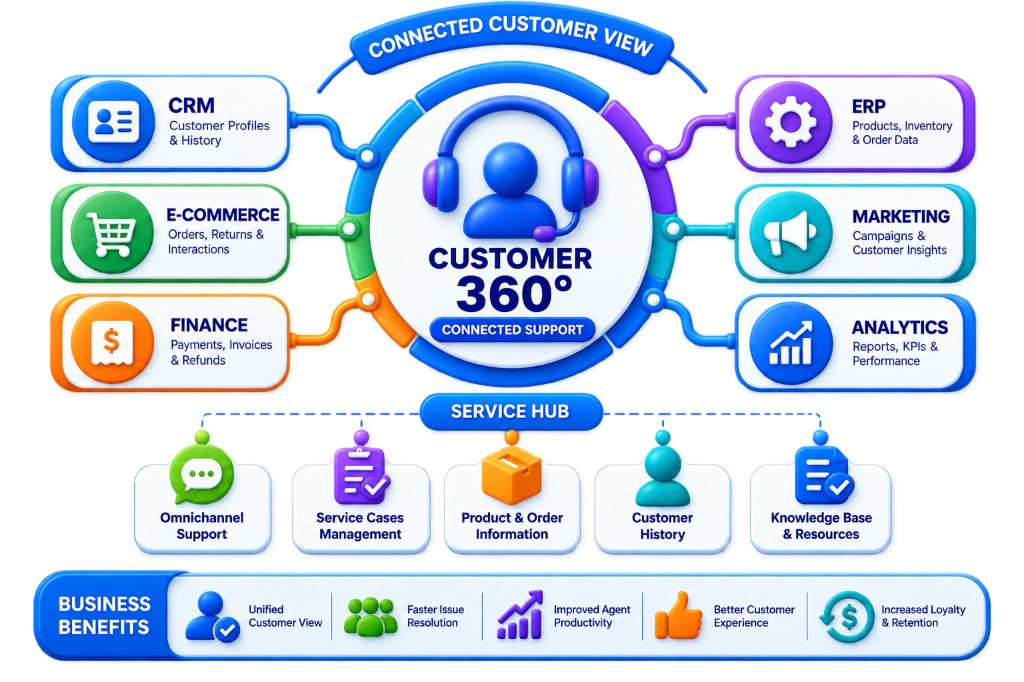
What Is Customer 360 Customer Service Integration?
Customer 360 customer service integration connects customer support platforms with applications that contain transactional, financial, and relational customer records. Without integration, agents waste time searching multiple disconnected tools.
Support Teams Connected to 9+ Core Enterprise Systems:
Why Is Customer Service Integration Important for Customer 360?
A support ticket is rarely an isolated event. Customers bring complex histories across orders, payments, and warranties:
Instant Customer Context
View full account tier, purchase history, and VIP status when a ticket arrives.
Rapid Information Access
Retrieve order tracking and invoice balances in under 1 second.
Zero App Switching
Eliminate repetitive logging into 5 different portals to find shipment info.
Connected Workflows
Trigger ERP return authorizations directly from the help desk interface.
Intelligent Case Triage
Route high-value corporate accounts to dedicated senior specialists.
Superior Customer CSAT
Provide accurate first-contact answers without putting buyers on hold.
Cross-Team Alignment
Keep sales reps informed of open tickets before renewal conversations.
Automated Resolution
Enable self-service portal lookups for tracking numbers and return labels.
Unified Interaction Log
Consolidate emails, phone calls, chats, and portal tickets into one timeline.
Actionable Support Analytics
Identify recurring product defects and optimize first-contact resolution rates.
Connected Systems & Support Data Scope
Integrating customer service applications with CRM relationships, ERP inventory, finance ledgers, and omnichannel channels.
CRM Integration
Connect customer accounts, contact directories, sales pipeline opportunities, account managers, and interaction timelines.
ERP Integration
Connect sales orders, product SKUs, warehouse inventory levels, courier tracking, and invoice statuses.
E-commerce Integration
Access digital storefront customer records, line-item purchases, payments, shipping methods, and RMA return requests.
Finance Integration
View invoice payment status, credit memos, processed refunds, and dispute logs directly within the ticket view.
Marketing Integration
Exchange campaign interaction telemetry, pause promotional emails during active complaints, and sync CSAT scores.
Analytics & BI Integration
Feed ticket resolution durations, agent productivity metrics, and recurring product defect trends into executive dashboards.
Customer Portals
Connect client-submitted support cases, knowledge base search logs, and ticket tracking status in real-time.
6 Core Support Data Domains Integrated
Customer Data
Customer ID, Contact details, Account tier, VIP status, Account Executive
Case Data
Case ID, Subject, Priority level, SLA timers, Assigned agent, Resolution notes
Order Data
Order ID, Line items, Delivery tracking, Order value, Purchase timestamp
Product Data
Product ID, SKU code, Warranty coverage, Serial numbers, Known errata
Financial Data
Invoice reference, Payment gateway status, Approved refund, Credit note
Interaction Data
Inbound phone calls, Email transcripts, Live chat logs, Portal messages
Customer 360 Customer Service Architecture Flow
Customer 360 Customer Service Integration Process
A proven 10-step methodology for implementing unified customer support architectures.
Understand the Service Journey
Map end-to-end support workflows: ticket creation, tier triage, investigation, escalation, order verification, resolution, and closure.
Identify Service Systems
Document help desks (Zoho Desk, Zendesk), CRM platforms, ERP accounting, e-commerce storefronts, customer portals, and telemetry.
Identify Required Customer Context
Define critical agent information: customer profile, open/past orders, product warranties, unpaid invoices, previous case resolutions.
Define Systems of Record
Establish authoritative master records: CRM (Contacts & Accounts), ERP (Orders & Invoices), Service Desk (Tickets & SLA logs).
Define Service Data Model
Connect entities into a unified graph: Customer ➔ Account ➔ Sales Orders ➔ Products ➔ Service Tickets ➔ Support Interactions.
Map Data Across Applications
Align field schemas (Service Contact ID ➔ CRM Contact, Case ID ➔ CRM Case, Order Reference ➔ ERP Sales Order Number).
Define Synchronization Rules
Configure real-time webhook listeners, bidirectional case updates, conflict resolution protocols, and data transformation rules.
Implement Integration Pipelines
Deploy low-latency REST connectors, embedded CRM widgets inside the service desk, automated RMA workflows, and webhook handlers.
Test Support Scenarios
Validate ticket creation, live order lookup, automated priority scoring, return merchandise authoring, and security access controls.
Monitor and Optimize
Track API latency, first-contact resolution (FCR) rate improvements, synchronization error logs, and CSAT customer satisfaction scores.
Automated Support Workflows & Data Mapping
Empowering service agents with autonomous triage and cross-system entity synchronization.
1. New Case Creation
2. Order Issue Resolution
3. Return & Refund Workflow
Cross-Platform Customer Service Data Mapping
| Service Desk Entity | CRM System | ERP Accounting | E-commerce Store |
|---|---|---|---|
| Customer ID | Contact ID / Account | Customer Code | Storefront User ID |
| Case / Ticket ID | CRM Case ID | Reference Note | Support Reference |
| Order ID | Order Reference | Sales Order Number | Checkout Order ID |
| Product ID | Product Name | Item Master SKU | Catalog Variant ID |
| Payment Status | Payment Term | Invoice Ledger Status | Gateway Payment Status |
8 Connected Omnichannel Service Streams
Support Integration Challenges
Support Integration Best Practices
Phased Rollout Strategy & Prioritization
A structured multi-phase execution that empowers service agents rapidly while unifying back-office systems.
Service + CRM
Connect contact records, account managers, and customer lifecycle histories.
Service + ERP
Connect live sales orders, warehouse fulfillment, and invoice statuses.
Service + E-commerce
Sync storefront order line items, tracking numbers, and automated RMA returns.
Service + Finance
Connect payment gateway authorizations, refunds, and credit ledger balances.
Service + Analytics
Deploy first-contact resolution (FCR), CSAT metrics, and defect trend reports.
Omnichannel Automation
Deploy unified CTI telephony, mobile chat, and autonomous portal bots.
Why Choose NuageCX for Customer Service Integration?
Customer-Centric Architecture
Design support workflows around real resolution journeys and CSAT goals.
CRM Profile Mastery
Connect customer relationships, account tiers, and history with the help desk.
ERP Operational Connectivity
Connect sales orders, inventory availability, and invoices in real-time.
E-commerce Stream Synchronization
Connect storefront orders, delivery tracking, and self-service returns.
Unified Data Fabric
Synchronize customer identities, ticket tags, and cross-system interaction logs.
Robust API & Webhook Pipelines
Deploy sub-second REST connectors and resilient event listeners.
Autonomous SLA Escalation
Trigger automated manager alerts and SLA countdowns based on tier.
Support BI & Analytics
Connect ticket resolutions with customer lifetime value and retention.
Strict Data Governance
Establish system of record ownership and strict validation controls.
Security & Access Controls
Apply role-based permissions and masked PII data protection.
Zoho Ecosystem Expertise
Seamlessly integrate Zoho Desk, Zoho CRM, Zoho Books, and Zoho Flow.
Full-Lifecycle Implementation
Provide end-to-end support: discovery, architecture, mapping, testing, and deployment.
Frequently Asked Questions
Everything you need to know about Customer 360 customer service integration, CRM, ERP, webhooks, omnichannel, costs, and timeline.
Connect Customer Service With Your Customer 360 Architecture
Customer service is one part of the broader customer relationship.
NuageCX helps businesses integrate customer service with CRM, ERP, e-commerce, finance, marketing and analytics systems as part of a structured Customer 360 architecture.