Customer 360 Data Quality Management Services for Reliable Enterprise Context
Improve the accuracy, completeness, consistency, uniqueness, validity, and timeliness of customer data across CRM, ERP, e-commerce, customer service, marketing, finance, and other business systems.
NuageCX helps businesses identify, measure, correct, and continuously manage customer data quality to create a more reliable foundation for Customer 360, analytics, automation, and customer experience.
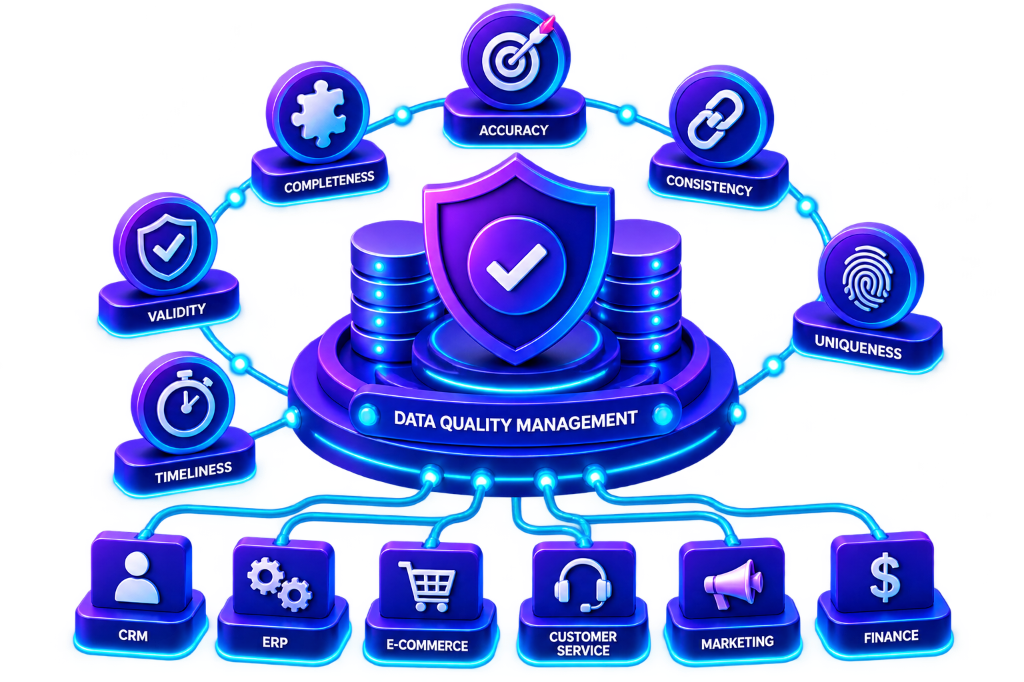
What Is Customer 360 Data Quality Management?
Customer 360 data quality management is the process of identifying, measuring, improving, and maintaining the quality of customer information across connected business systems. Customer data degrades over time as users enter invalid info, systems use conflicting taxonomies, and duplicates multiply across CRM and ERP.
9 Common Customer Data Quality Issues Resolved:
Why Is Customer 360 Data Quality Important?
Customer 360 depends on reliable customer information. Poor data quality directly impairs:
The Six Dimensions of Customer 360 Data Quality
The foundational pillars used to measure, audit, and benchmark enterprise customer records.
Accuracy
Does the data correctly represent the customer?
Measures whether names, phone numbers, tax IDs, and billing entities correspond to ground truth.
Completeness
Are the required customer attributes available?
Measures whether mandatory business attributes (email, phone, industry, credit tier) are populated.
Consistency
Is information represented consistently across systems?
Ensures that values and statuses match across CRM, ERP, commerce, and customer service desks.
Uniqueness
Does each customer have an appropriate unique representation?
Prevents duplicate records from fragmenting transaction history and distorting business analytics.
Validity
Does the information follow defined business rules?
Validates syntax, regex formats, allowable reference sets, and approved domain vocabularies.
Timeliness
Is the information current enough for its intended use?
Tracks the freshness and synchronization latency of customer updates across connected endpoints.
Customer 360 Overall Data Quality Score Formula
Organizations calculate a single composite quality benchmark across the 6 core dimensions:
11-Step Data Quality Management Workflow
A continuous, end-to-end framework to assess, cleanse, standardize, and protect customer records.
Continuous Data Quality Lifecycle:
Identify Data Sources
Map customer data across CRM, ERP, e-commerce, support desks, marketing automation, and portals.
Create a Data Inventory
Catalog all customer entities, source fields, accountable owners, identifiers, and dependencies.
Profile Customer Data
Run statistical profiling on null rates, duplicates, pattern violations, and inconsistent schemas.
Define Quality Rules
Formulate quantifiable validation rules for emails, phones, customer IDs, and business attributes.
Measure Data Quality
Calculate baseline dimension scores across accuracy, completeness, consistency, and uniqueness.
Identify Root Causes
Diagnose why quality errors occur (uncontrolled web forms, legacy imports, human error, bad syncs).
Cleanse Data
Execute automated cleansing to strip whitespace, fix syntax, remove bad characters, and correct typos.
Standardize Data
Normalize values into uniform schemas (ISO country codes, title casing, standardized phone formats).
Validate Data
Enforce strict schema validation rules across all incoming API integrations and webhooks.
Monitor Continuously
Deploy real-time dashboards to track duplicate creation rates, validation drops, and freshness.
Prevent Recurring Issues
Implement upstream form controls, user input masks, and validation logic to block bad data.
Data Profiling, Cleansing & Standardization
Transforming raw, noisy customer records into clean, standardized enterprise assets.
Customer Data Profiling Diagnostics
Profiling identifies hidden systemic errors before unification begins:
Cross-System Standardization
Normalizing conflicting representations across disparate business systems:
Customer 360 Duplicate Detection & Survivorship Management
Not every similar record should automatically be merged. Our 7-stage duplicate management process classifies candidates before executing survivorship merges:
Automated Validation Rules
Governed Data Enrichment
Augmenting customer profiles with approved external datasets:
Customer Data Quality Across Enterprise Systems
Auditing, cleansing, and synchronizing customer records across every operational touchpoint.
CRM Data Quality
Eliminates duplicate contacts, standardizes sales account names, and updates obsolete phone numbers.
ERP Data Quality
Validates tax IDs, standardized billing addresses, credit limits, and prevents invoicing delivery failures.
E-commerce Data Quality
Validates high-volume shopping carts, postal codes, payment receipts, and guest checkout profiles.
Customer Service Quality
Ensures support agents have accurate contact details, verified warranty statuses, and case histories.
Marketing Data Quality
Enforces explicit opt-in compliance, suppresses bounced emails, and sharpens behavioral audience cohorts.
Analytics Data Quality
Guarantees clean, unified customer definitions so executive reporting reflects true churn and LTV.
Data Quality Challenges
Data Quality Best Practices
Data Quality Improvement Roadmap & Monitoring
A 12-phase execution roadmap and measurable KPIs for continuous quality assurance.
Quality Assessment
Evaluate existing customer records across CRM, ERP, and commerce to benchmark baseline accuracy.
System Profiling
Run deep profiling algorithms to identify null fields, format mismatches, and orphan accounts.
Impact Prioritization
Rank quality issues by commercial impact across sales pipeline, invoicing, and support SLAs.
Quality Rules Definition
Formulate deterministic business and syntax rules for emails, phones, tax IDs, and postal codes.
Automated Cleansing
Execute automated cleansing batches to sanitize corrupt strings, whitespace, and formatting.
Data Standardization
Normalize values to ISO standards (e.g. ISO 3166-1 country codes and uniform status taxonomies).
Deduplication & Survivorship
Run deterministic and fuzzy matching to consolidate duplicate profiles into Golden Records.
Input Validation Controls
Implement front-end and API validation hooks to block invalid customer records at source.
Real-Time Monitoring
Deploy automated quality monitors and anomaly alerts tracking error spikes and drift.
Governance & Stewardship
Assign operational data stewards with automated exception queues for manual review.
Root Cause Remediation
Fix upstream webforms, integration sync scripts, and user workflows generating dirty data.
Continuous Optimization
Perform periodic quality score audits and refine matching algorithms as business scale grows.
Continuous Data Quality Dashboard Metrics
Data Quality vs Data Governance
1: Data Quality measures and improves the condition and reliability of information.
2: Data Governance establishes policies, ownership, standards, security, and controls.
Data Quality vs Data Cleansing
1: Data Quality describes the overall condition, health, and reliability of data.
2: Data Cleansing is the operational activity used to fix identified errors.
Data Quality vs Data Validation
1: Data Quality covers the end-to-end process of profiling, cleansing, and monitoring.
2: Data Validation checks whether specific records conform to predefined rules.
Why Choose NuageCX for Customer 360 Data Quality Management?
Data Quality Assessment
Rapidly identify the current condition, duplicate volume, and hygiene gaps across systems.
Automated Data Profiling
Analyze customer tables to expose null values, anomalous patterns, and corrupted formats.
Precision Data Cleansing
Cleanse syntax errors, eliminate typos, and normalize text strings without data loss.
Global Standardization
Standardize country codes, phone numbers, addresses, and status taxonomies to ISO norms.
Intelligent Deduplication
Identify and resolve duplicate customer records with configurable survivorship rules.
Identity Resolution
Connect fragmented touchpoint records to build authoritative Golden Customer Profiles.
Preventive Input Validation
Implement real-time form validation and API gateways to block dirty data at the point of entry.
Continuous Monitoring
Track customer data health with automated dashboards, anomaly alerts, and KPI tracking.
Data Governance Integration
Establish operational data stewardship, clear ownership, and standard data dictionaries.
Multi-System Expertise
Cleanse customer data across CRM, ERP, e-commerce, customer service, marketing, and BI.
Zoho Ecosystem Specialization
Optimize data quality across Zoho CRM, Zoho Books, Zoho Analytics, and Zoho Creator.
End-to-End Implementation
Full lifecycle support from initial audit to automated cleansing, validation, and long-term hygiene.
Frequently Asked Questions
Everything you need to know about Customer 360 data quality, profiling, cleansing, deduplication, and monitoring.
Improve the Quality Behind Your Customer 360
A Customer 360 strategy cannot deliver reliable customer context when the underlying data is incomplete, duplicated, inconsistent, invalid, or outdated.
NuageCX helps businesses assess, cleanse, standardize, validate, deduplicate, monitor, and govern customer data across CRM, ERP, e-commerce, customer service, marketing, finance, and analytics systems.