Ready to start?Request Consulting

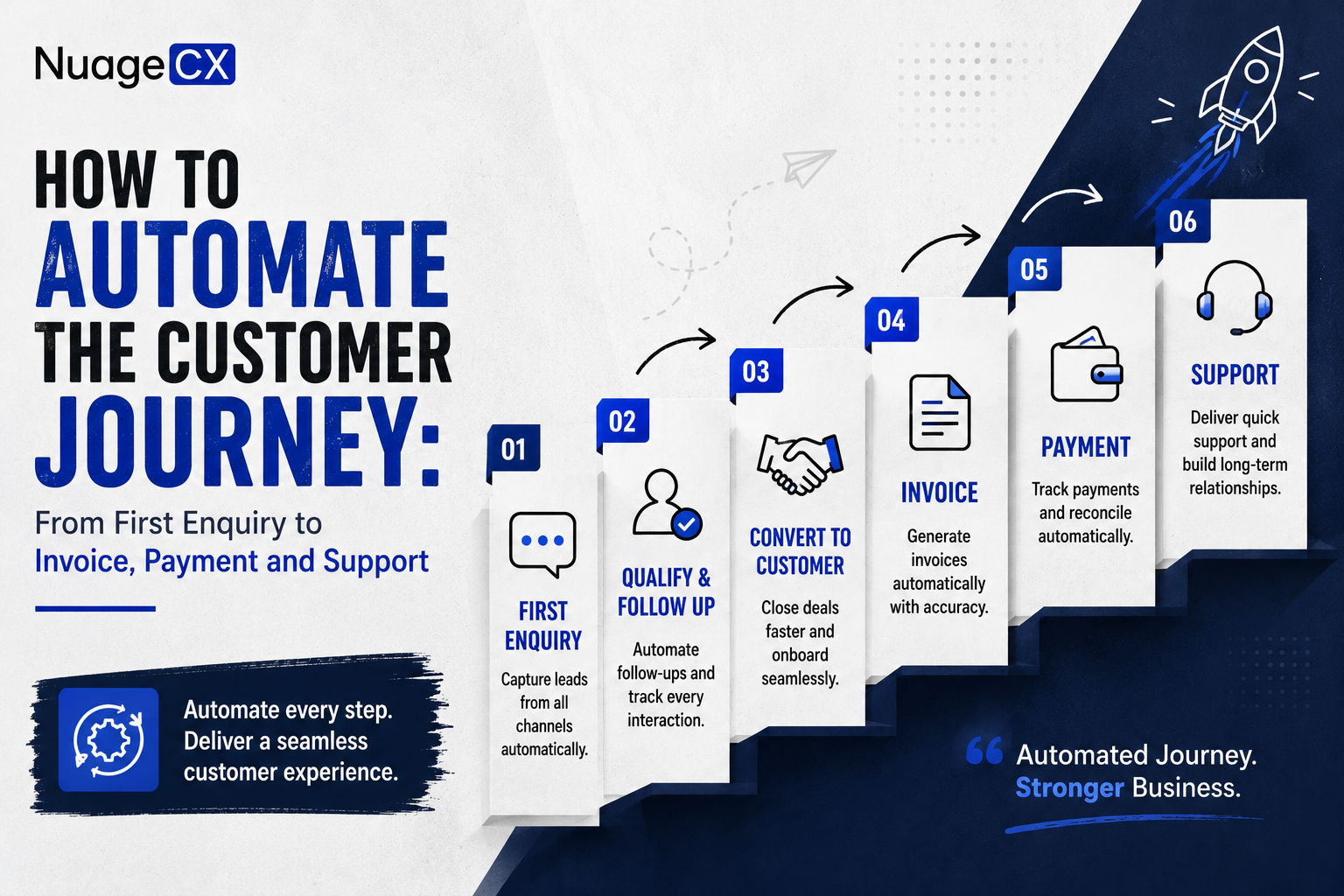
How to Automate the Customer Journey: From First Enquiry to Invoice, Payment and Support

Tanmay Dhake
September 2026
How to Automate the Customer Journey: From First Enquiry to Invoice, Payment and Support
Looking to automate the complete customer journey from enquiry to sales, invoicing, payment and support? See how CRM, marketing, finance, ERP and customer support can work together through Zoho to create an automated customer lifecycle and a connected Customer 360 experience.

Step 6: Connect Sales With Finance and Invoicing

The customer journey becomes even more important when money enters the process.

After a sale, finance may need to:
• Create an invoice
• Track payment
• Monitor outstanding balances
• Reconcile transactions
• Follow up on receivables

If finance receives information manually, delays can occur.

A connected CRM and finance environment can create a smoother transition:
Deal → Customer → Order → Invoice → Payment

Zoho CRM and Zoho Books can form part of this workflow.

The exact integration should be configured according to how your business manages customers, orders, invoices and payments.

This can help sales and finance work from connected customer information instead of maintaining separate records.

Step 9: Automate Customer Onboarding

The customer experience does not end after payment.

For many businesses, onboarding is one of the most important stages.

The onboarding process may require:
• Welcome communication
• Documentation
• Account setup
• Product configuration
• User access
• Training
• Project creation
• Internal task assignment
• Customer success activities

These steps can be triggered after a deal is closed or payment is confirmed.

For example:
Deal Won → Customer Created → Onboarding Tasks → Internal Assignment → Customer Communication → Delivery

This creates a consistent experience for every new customer.

Instead of relying on a salesperson to remember every onboarding step, the system can manage the workflow.

Step 1: Capture Every Customer Enquiry

The customer journey starts before the sales opportunity exists.

Potential customers may contact your business through:
• Website forms
• Search campaigns
• Social media
• Email
• Phone
• Events
• Referrals
• Landing pages
• Chat
• Online enquiries

The first requirement is to make sure these enquiries reach the right system.

Instead of manually collecting enquiries from multiple sources, businesses can connect relevant lead sources with CRM.
Once the enquiry enters the CRM, the next workflow can begin.

For example:
Enquiry → Lead Creation → Lead Assignment → Notification → Qualification

This means the sales team does not have to depend entirely on someone checking emails or spreadsheets.

The lead enters the defined business process.

That is the first step toward customer journey automation.

Step 3: Move Qualified Leads Into the Sales Pipeline

Once a lead is qualified, the customer journey moves into sales.

The CRM can track:
• Opportunity value
• Sales stage
• Expected closing date
• Products or services
• Decision makers
• Sales activities
• Follow ups
• Proposals
• Negotiations

A typical process can look like:
Qualified Lead → Opportunity → Proposal → Negotiation → Won

Automation can trigger relevant actions as the opportunity progresses.

For example, a stage change can trigger:
• Internal notifications
• Follow up tasks
• Approval workflows
• Customer communication
• Documentation
• Finance related processes

This creates a structured transition from lead management to revenue generation.

Step 5: Convert the Deal Into an Order

When the customer accepts the proposal, the sales process should not restart in another system.

The customer information already exists.
The opportunity already exists.

The products or services already exist.
The commercial information already exists.

The next business process should be able to use the relevant information.

A connected workflow can move from:
Won Deal → Customer → Sales Order → Operations / ERP

This reduces unnecessary re-entry of information.
For businesses managing physical products, the order may then move into inventory or ERP.

For service businesses, it may move into project management or service delivery.

For complex organizations, additional approvals may be required.

The workflow should reflect the business rather than forcing every company into the same process.

Can Zoho Automate the Complete Customer Journey?

Zoho provides applications across many of the functions involved in the customer lifecycle.

A connected environment can include:
• Zoho CRM
• Zoho Books
• Zoho ERP
• Zoho Inventory
• Zoho Desk
• Zoho Analytics
• Zoho Projects
• Zoho Creator
• Zoho Flow
• Zoho Campaigns
• Zoho SalesIQ
• Zoho Sign
• Zoho Expense
• Zoho People
• Zoho Payroll

The exact combination depends on the business.
For some organizations, CRM and Books may be the starting point.

For others, CRM, ERP, Inventory, Desk and Analytics may be more important.
Organizations looking for broader business automation can also evaluate Zoho One as an ecosystem approach.

The key is to design the connections around the customer journey rather than implementing applications independently.

From First Enquiry to Customer 360

The customer journey starts with a single enquiry.

But the relationship quickly moves across multiple departments.
Marketing generates interest.

Sales creates the opportunity.
Finance manages the transaction.

ERP and operations fulfil the requirement.
Support manages the post sale relationship.

Analytics helps management understand the outcome.
If these systems remain disconnected, the customer journey becomes fragmented.

If they are connected, the business can build a continuous flow of information.

That is the foundation of Customer 360.
The goal is not simply to automate one step.

The goal is to create a business environment where the customer relationship remains connected from first enquiry through revenue, delivery, support and future growth.

Step 4: Automate Quotations and Approvals

Once the customer is interested, many businesses move into quotation and proposal management.

This is another point where manual processes can slow down the customer journey.

Employees may create quotations manually.
Managers may approve them through email.

Salespeople may send revised versions.
Finance may receive information separately.

A connected workflow can create a more structured process:
Opportunity → Quotation → Approval → Customer → Acceptance

Depending on the business, quotation workflows can include:
• Pricing rules
• Discounts
• Approval thresholds
• Sales notifications
• Customer communication
• Document generation
• Digital signatures

Zoho applications can be configured to support these workflows depending on the business requirement.

Why Automation Projects Fail Even With Good Software

Buying the right software does not automatically produce the right outcome.

Automation projects can fail when businesses:
• Automate poorly designed processes
• Maintain duplicate customer records
• Ignore data migration
• Implement applications independently
• Skip integration planning
• Overcomplicate workflows
• Give employees unclear processes
• Do not define ownership of customer data

This is why business process design matters.

Before automation begins, the organization needs to understand how the customer journey actually works.

Only then should the technology architecture be designed around it.

What Does an Automated Customer Journey Look Like?

A connected customer journey can look like:
Marketing → Enquiry → CRM → Qualification → Sales → Quotation → Deal → Order → Invoice → Payment → Delivery → Support → Retention

The exact workflow will vary depending on the business.
A service company may move from enquiry to proposal to project delivery.

A manufacturing company may move from enquiry to quotation to order to production to delivery.

A distributor may move from enquiry to order to inventory to delivery.

A subscription business may focus on onboarding, recurring billing, renewals and support.

The technology should therefore be configured around the actual customer journey.

The objective is not simply to automate activities.
It is to make the transition between activities more reliable.

Step 8: Connect Orders With ERP and Operations

For businesses that deliver products or complex services, a successful sale creates operational work.

An order may need to trigger:
• Inventory allocation
• Procurement
• Production
• Project creation
• Warehouse activity
• Delivery
• Installation
• Service

This is where CRM needs to connect with ERP or operational systems.

A manufacturing workflow might look like:
CRM → Sales Order → ERP → Production → Inventory → Delivery → Finance

A distribution workflow might look like:
CRM → Sales Order → Inventory → Warehouse → Delivery → Invoice

A professional services workflow might look like:
CRM → Deal → Project → Resources → Delivery → Invoice

The same customer journey can therefore produce completely different operational workflows depending on the business model.

Your Customer Journey Should Not Depend on Manual Handoffs

A customer journey can involve dozens of interactions before and after a sale.

A prospect discovers your business.
They submit an enquiry.

The lead reaches sales.
A salesperson follows up.

The opportunity is qualified.
A quotation is prepared.

The customer accepts.
An order is processed.

Finance creates an invoice.
The payment is received.

Operations fulfils the requirement.
Customer support takes over after the sale.

In many businesses, every one of these stages is handled through a different application, spreadsheet, email thread or manual handoff.

That creates unnecessary delays.

If you want to automate the customer journey, the objective should not be to automate only one step.

The opportunity is to connect the complete journey.

A connected Zoho environment can bring CRM, marketing, finance, ERP, operations, customer support and analytics into a broader business automation architecture.

The result is a customer lifecycle that can move from first enquiry to post sale support with fewer manual handoffs and a stronger Customer 360 foundation.

Step 2: Automatically Assign and Qualify Leads

Not every enquiry has the same value.
Some may be ready to buy.

Some may need more information.
Some may not match your target market.

A structured CRM process can help sales teams classify and prioritize leads.

Automation can support:
• Lead assignment
• Lead scoring
• Follow up reminders
• Sales notifications
• Lead status updates
• Qualification workflows
• Activity tracking

For example:
New Lead → Assigned Salesperson → Qualification → Qualified / Disqualified

This creates a consistent process across the sales team.

The objective is not to remove the salesperson from the process.

It is to remove repetitive administration around the salesperson.

Ready to Automate Your Complete Customer Journey?

If your business is currently moving customer information manually from enquiries to CRM, sales to finance, orders to ERP and customers to support, there is an opportunity to redesign the complete workflow.

NuageCX helps businesses assess their current customer journey and build connected Zoho environments across CRM, sales, marketing, finance, ERP, HRMS, operations, customer support and analytics.

Whether you need Zoho CRM, Zoho One, Zoho ERP, finance integration, customer support automation or a complete Customer 360 environment, the solution should be designed around how your business actually operates.

Tell us where your customer journey currently breaks, which processes are manual and what you want to automate.

Get Your Customer Journey Automation Assessment

Step 7: Automate Payment Tracking and Customer Follow Up

Getting an invoice created is not the end of the financial process.

Businesses also need visibility into payment status.

A connected system can help teams understand:
• Which invoices are open
• Which payments have been received
• Which customers have outstanding balances
• Which transactions require follow up

Relevant workflows can trigger internal actions or customer communications based on configured conditions.

This can reduce the need for employees to manually check multiple systems.

It also gives sales teams better context.

For example, account managers may need to know whether a customer has outstanding financial obligations before pursuing another commercial opportunity.

This is another example of why Customer 360 extends beyond CRM.

Step 10: Connect Customer Support After the Sale

After onboarding, customers may require ongoing support.

A connected customer journey should therefore continue into customer service.

The workflow can become:
Customer → Purchase → Onboarding → Support → Renewal / Expansion

Customer support teams can work with relevant information from the customer's broader relationship.

This may include:
• Customer profile
• Products purchased
• Sales history
• Orders
• Previous support requests
• Account information
• Relevant service history

Zoho Desk can form the customer support layer while Zoho CRM can maintain the broader customer relationship.

This helps create continuity between sales and service.

How Customer 360 Fits Into the Automated Customer Journey

Customer 360 brings the entire relationship into context.

A customer may have:
CRM data
Sales history

Marketing engagement
Orders

Invoices
Payments

ERP activity
Support tickets

Projects
Analytics

If every department sees only its own information, the customer relationship remains fragmented.

Customer 360 connects the relevant information so that teams can understand the broader relationship.

For example:
Sales can understand customer history.
Finance can understand commercial activity.

Support can understand the products and services involved.
Marketing can understand engagement.

Management can understand customer value.
Operations can understand fulfilment history.

This creates a business that sees the customer as one relationship rather than several disconnected records.

What Businesses Should Automate First

Not every business needs to automate everything at once.

A practical approach is to identify the processes causing the most manual work or customer friction.

Common priorities include:
• Lead capture
• Lead assignment
• Sales follow ups
• Quotation approval
• Customer creation
• Order processing
• Invoice generation
• Payment tracking
• Customer onboarding
• Support ticket management
• Management reporting

Once the highest value workflows are connected, additional automation can be introduced.

This creates a more manageable transformation than attempting to redesign the entire organization simultaneously.

Why NuageCX for End to End Customer Journey Automation?

NuageCX helps businesses move beyond standalone CRM implementation toward connected business automation.

The approach can cover the customer lifecycle across:
• Marketing
• CRM
• Sales
• Finance
• Accounting
• ERP
• Inventory
• Operations
• HRMS
• Projects
• Customer Support
• Analytics

Depending on the business requirement, NuageCX can implement and connect relevant Zoho applications including Zoho CRM, Zoho One, Zoho Books, Zoho ERP, Zoho Inventory, Zoho Desk, Zoho Analytics, Zoho People, Zoho Projects, Zoho Creator and others.

The implementation can include:
• Business process discovery
• Solution architecture
• CRM implementation
• Data migration
• Workflow automation
• Application integration
• Customization
• Reporting
• Customer 360 design
• Ongoing optimization

The goal is to create a connected business system in which the customer journey does not break every time it moves from one department to another.

Step 11: Use Customer Data for Renewals, Upselling and Cross Selling

The customer journey should continue beyond the first purchase.

Once the business has connected customer information, it can identify future commercial opportunities.

For example:
Customer → Existing Products → Support History → Engagement → Renewal → Upsell → Cross Sell

Sales and account management teams can use customer information to identify opportunities based on the relationship.

Marketing can create relevant engagement.
Support can identify recurring requirements.

Finance can provide commercial context.
Analytics can help management identify trends.

This is where connected customer data becomes commercially valuable.
The objective is not to bombard customers with offers.

It is to understand the relationship well enough to provide relevant products, services and support at the right time.

What Does an End to End Automated Customer Journey Look Like?

A connected customer lifecycle can look like:
Website / Marketing
Lead Capture
Zoho CRM
Lead Qualification
Sales Opportunity
Quotation
Approval
Deal Closure
Customer Creation
Order
ERP / Inventory / Projects
Invoice
Payment
Customer Onboarding
Zoho Desk / Support
Analytics
Renewal / Upsell / Cross Sell

This creates a continuous customer lifecycle.

Instead of each department starting with a new customer record, the relationship continues through connected systems.

Share this blog

Send us a Message

You Want To Implementing Zoho One

Let's discuss how we can help you achieve similar results with our proven methodologies and expertise.

More Blog Posts

View All

Blog Posts

Explore Our Latest Insights

Browse our complete collection of blog posts featuring industry insights, best practices, and innovative solutions across various technologies.