Zoho One
Implementation Services

Implement Zoho One around your business, not around a generic software setup. NuageCX helps you plan the right applications, configure workflows, migrate relevant data, connect systems, train users and launch Zoho One in a structured way.

Zoho Premium
Partner
100+
Projects Delivered
16+
Industries Served
8+
Years Experience
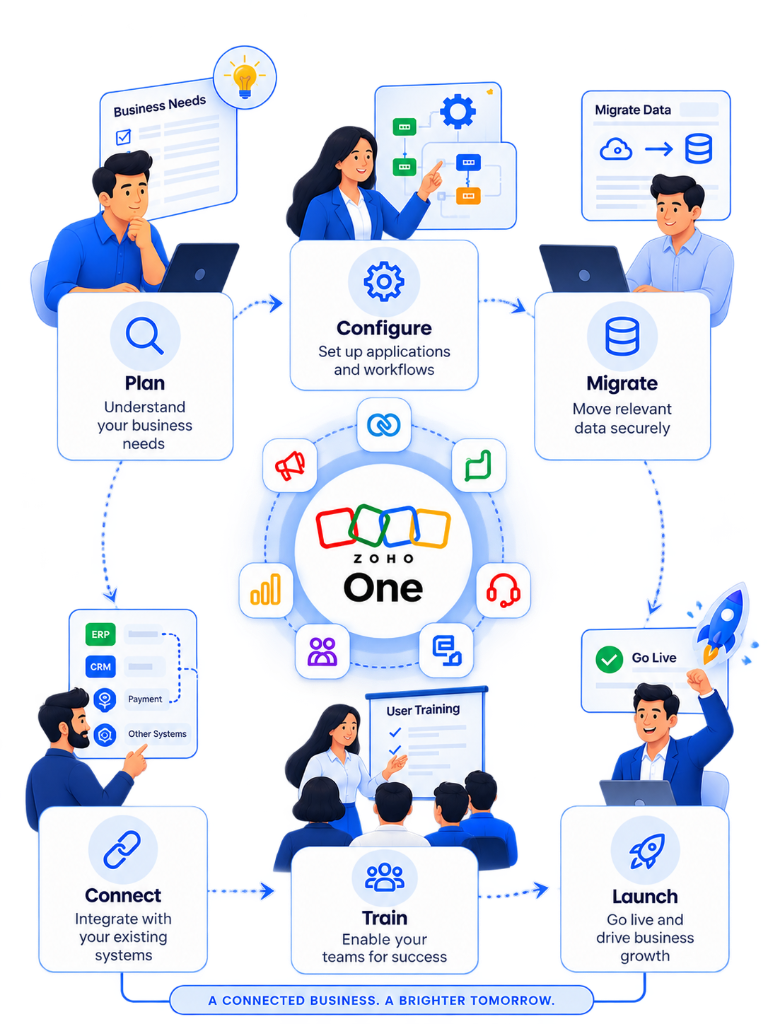
Zoho One Implementation Journey - Plan, Configure, Migrate, Connect, Train, Launch
DEFINITION & SCOPE

What Does Zoho One Implementation Mean?

Zoho One implementation is the process of designing, configuring, integrating and deploying Zoho One around a company's actual business processes.

The Primary Objective

The objective is not to activate every application. It is to build the right Zoho One environment for the way your business operates.

Scope & Lifecycle Elements Included

1
Business process mapping
2
Application configuration
3
Workflow automation
4
Data migration
5
Third-party integration
6
Customization & Deluge
7
User permissions & Security
8
Testing & UAT Validation
9
Role-based User Training
10
Go-live production support
11
Post-launch optimization
COMPARISON

Why Zoho One Implementation Is More Than Setup

Activating standard software is quick; building an integrated, automated operation takes structured execution.

GENERIC SETUP

Standard Setup Includes

  • Activate standard application licenses
  • Add users and assign basic security roles
  • Configure default out-of-the-box system parameters
  • Provide generic user login access
Setup gives you software access.
NUAGECX IMPLEMENTATION

Business Implementation Includes

Understand business processes
Design application architecture
Configure custom workflows
Connect applications natively
Migrate business data
Automate repetitive work
Test real business scenarios
Train users by role
Manage structured rollout
Optimize after go-live
Implementation turns software into a working business system.
DELIVERABLES

What We Implement

Eight essential pillars configured to turn Zoho One into an operational backbone.

01

BUSINESS PROCESS DESIGN

Map how leads, customers, employees, projects, transactions and approvals move through your organization.

02

ZOHO APP CONFIGURATION

Configure relevant Zoho One applications, modules, fields, layouts, roles, permissions, workflows and reports.

03

CROSS-APP WORKFLOWS

Connect processes natively: CRM → Projects → Timesheets → Finance → Analytics.

04

WORKFLOW AUTOMATION

Automate assignments, follow-ups, approvals, notifications, task creation, status updates and escalations.

05

DATA MIGRATION

Assess, clean, map, test and migrate relevant historical data safely from existing software or spreadsheets.

06

INTEGRATION

Connect Zoho One with third-party applications, websites, databases and external business systems.

07

CUSTOMIZATION

Use custom functions, custom modules, or Creator applications when standard functionality requires extension.

08

TRAINING + GO-LIVE

Prepare administrators and end users, validate workflows and support controlled production rollout.

METHODOLOGY

How We Implement Zoho One

Our structured 10-step implementation lifecycle ensures predictable delivery, zero data loss, and high adoption.

1
PHASE 01

DISCOVER

Understand your business model, departments, users, current software and pain points.

2
PHASE 02

MAP

Document important workflows, approvals, data movement and manual processes.

3
PHASE 03

DESIGN

Define the required Zoho One applications, architecture and integration approach.

4
PHASE 04

CONFIGURE

Configure applications, fields, roles, permissions, reports, workflows and approvals.

5
PHASE 05

CONNECT

Connect applications and external systems where required.

6
PHASE 06

MIGRATE

Clean, map, test and move approved business data.

7
PHASE 07

TEST

Validate workflows using real business scenarios and user acceptance testing.

8
PHASE 08

TRAIN

Prepare users and administrators for the new operating processes.

9
PHASE 09

GO LIVE

Launch the approved environment through a controlled rollout.

10
PHASE 10

OPTIMIZE

Refine workflows, automation, reporting and adoption after launch.

CORE PHILOSOPHY

Start With the Process. Then Choose the Apps.

A common implementation mistake is deciding which applications to deploy before understanding the business process. We work in the opposite direction.

EXAMPLE BUSINESS FLOWLead-to-Cash Integrated Pipeline
Lead
Qualification
Deal
Project
Timesheet
Invoice
Payment
Analytics
1. Map Zoho AppsAlign specific apps to corresponding operational stages.
2. Automate TransitionsEliminate manual re-entry between sales, project, and finance teams.
3. Executive DashboardsGather cross-departmental metrics in real time.
Key Takeaway: The right application architecture strictly follows the business process.
INDUSTRY EXAMPLES

What Does Implementation Look Like in Different Businesses?

Manufacturing Workflow

LeadQuotationOrderOperationsProcurementFinanceReporting
EVALUATION

When Should You Consider a Zoho One Implementation Partner?

Multiple departments are involved
Several Zoho applications need to work together
Existing data needs to be migrated safely
Your business requires custom workflows or scripts
Third-party integrations are required via API
Access and permissions need careful security design
The implementation affects critical daily operations
You need structured user adoption and role training
You want to avoid rebuilding the system after go-live
Official Zoho Partner Reference

Zoho describes consulting partners as providing services including implementation, customization, data migration, third-party integration, user training, and workflow automation.

Zoho Partner Info
STRATEGY

Do You Need a Full Zoho One Rollout?

Not necessarily. Zoho recommends phased deployment rather than trying to deploy the entire suite simultaneously.

PHASE 1

CRM + Core Sales

Lead management & pipeline setup

PHASE 2

Finance

Invoicing, expenses & Books sync

PHASE 3

Projects / Operations

Milestones, tasks & time tracking

PHASE 4

HR & People

Employee portal & onboarding

PHASE 5

Analytics

Cross-departmental BI reports

PHASE 6

Customization & Automation

Deluge scripts & API integrations

Key Message: Implement the processes that create the most value first.Source: Zoho One Application FAQ
PRICING & SCOPE

How Much Does Zoho One Implementation Cost?

There is no single universal implementation price. Scope varies based on business complexity.

Simple Scope

Fewer applications + Limited customization + Standard data migration + Core user training

Complex Scope

Multiple departments + 10+ applications + API integrations + Data migration + Custom Deluge functions + Advanced Analytics BI

View Zoho One Pricing Guide
PROPOSAL CHECKLIST

What Should Be Included in Your Proposal?

Business discovery
Process mapping
Solution architecture
Application configuration
User roles and permissions
Workflow automation
Data migration scope
Integration scope
Customization scope
Testing / UAT
User training
Go-live plan
Post-go-live support
Do not compare implementation proposals by price alone. Compare what each proposal actually includes.
TRANSFORMATION

Before and After Zoho One Implementation

Connected Business System

Configured Zoho ecosystem
Automated data flow
Single source of truth
Structured customer history
Digital multi-level approvals
Centralized executive BI
INTEGRATION FLOW

What Can a Properly Designed Workflow Connect?

MARKETING

Lead Capture

CRM

Qualification + Opportunity

PROJECTS

Delivery

TIMESHEETS

Billable Hours

FINANCE

Invoice

ANALYTICS

Business Visibility

VERIFIED EXPERIENCE

Real Zoho Implementation Experience

CASE STUDY 01

NEEVIQ

Stack: Zoho Projects + Zoho Books

Connected project and finance workflows with custom functionality for time tracking, reporting and invoicing.

Read Case Study
CASE STUDY 02

MEGA ENGINEERING

Stack: Zoho Creator + Zoho Books

Digitized procurement workflows covering BOM, material requests, purchase requests and purchase orders with finance connectivity.

Read Case Study
CASE STUDY 03

ENGINEERING SOLUTIONS

Stack: Zoho Creator + Zoho Books

Workflow digitization covering procurement, finance coordination, and real-time operational visibility.

Read Case Study
DIFFERENTIATION

Why Choose NuageCX for Zoho One Implementation?

BUSINESS-FIRST

We start by understanding your actual business processes.

ARCHITECTURE-FIRST

We define how applications work together before configuration.

IMPLEMENTATION

We configure the environment around approved workflows.

CUSTOMIZATION

We extend standard functionality when required.

INTEGRATION

We connect Zoho with relevant third-party systems.

MIGRATION

We help move and validate business data safely.

ADOPTION

We train users around actual daily tasks.

OPTIMIZATION

We continue improving the system after go-live.

We don't begin with: "Which Zoho apps do you want?"

We begin with: "How does your business work today?"

EXPECTATIONS

What You Should Expect From a Zoho One Partner

WHAT TO IMPLEMENT

Which applications solve priority problems?

WHAT TO CONNECT

Where should data move between systems?

WHAT TO AUTOMATE

Which repetitive processes justify automation?

WHAT TO MIGRATE

Which data is necessary for the new environment?

WHAT TO CUSTOMIZE

Where does standard functionality stop being enough?

WHAT TO MEASURE

How will you know implementation created business value?

FREQUENTLY ASKED QUESTIONS

Zoho One Implementation Questions

TAKE ACTION

Ready to Plan Your Zoho One Implementation?

Tell us what you use today, what is slowing your team down and what you want Zoho One to improve.

Loading security verification...